Voyage
Cypher Ocean Fishing automates Ocean Fishing in FFXIV. Choose points, missing Fish Guide entries or an achievement; it handles bait, casting, hooking and GP around that goal.
Automatic registration and fishing support both Indigo and Ruby routes.
Requires MadaoCore (FREE) from the Minion store.
Score / Points
Targets valuable fish and uses timed Double Hook, Triple Hook and Identical Cast combos to build your score.
Fish Guide Missing
Prioritises missing rare and fabled fish, then other missing entries. Uses points as a fallback when no completion target is available.
Achievement Focus
Targets the fish for your selected achievement instead of chasing score. Choose the achievement in Objectives.
Choose your Goal in Voyage, check Bait, then press START FISHING in the sidebar. STOP FISHING stops voyage automation.
Main
Changes to Fisher, travels to registration, joins the recommended route, accepts the duty and moves to a fishing rail. Repeats voyages while enabled.
Live fishing
Shows your stop, water state, bait, GP, Angler’s Art, active target, combo and next action. A displayed blue/fabled opportunity is not always the active target.
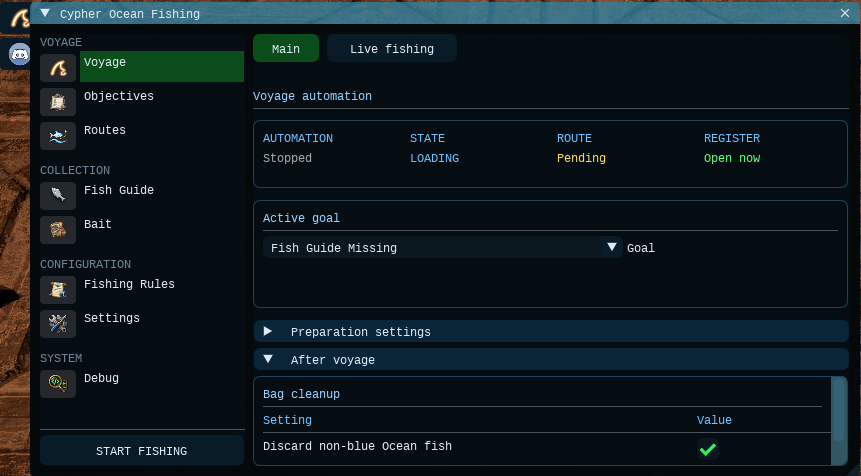
Off by default. After a voyage, deletes ALL ordinary Ocean fish in carried bags, including older stacks. Blue/fabled fish are kept.
Preparation and after-voyage options
Before you start
Objectives
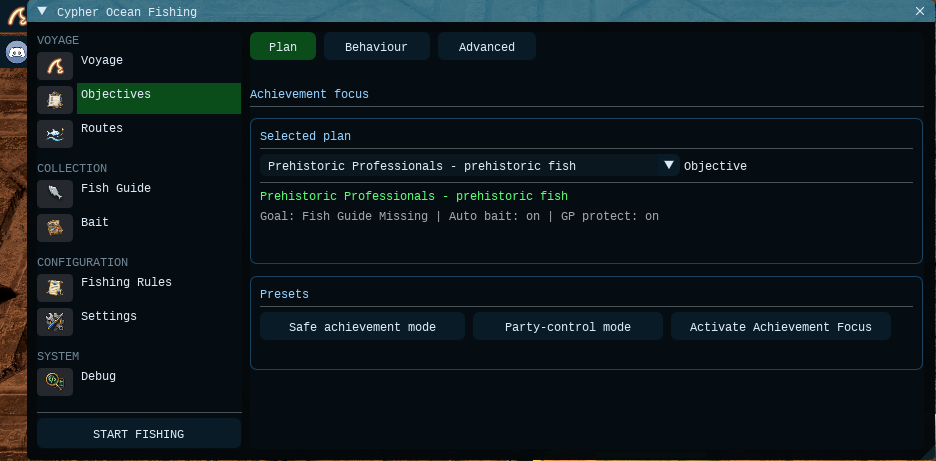
Set up a title or catch-objective run. Pick an objective, apply a preset and activate Achievement Focus. Selecting an objective alone does not change your Goal.
Safe achievement mode
The simpler starting preset: target bait, matching hooks, Rest/recast and GP protection. Spectral-control tools and risky blind hooks stay off.
Party-control mode
For coordinated premades. Enables extra spectral-control tools, including Surface Slap and lures. Chum and risky blind hooks still start off.
Plan
Shows the selected objective, active Goal, auto-bait status and GP protection. Achievement Focus must be active for these rules to take priority.
Choose an Objective, then press Safe achievement mode. Use Party-control mode only for a planned group strategy.
Available objectives
Behaviour and advanced options
Achievement runs may sacrifice score. Party achievements still need the party to meet the catch requirement; the addon only controls your character.
Routes
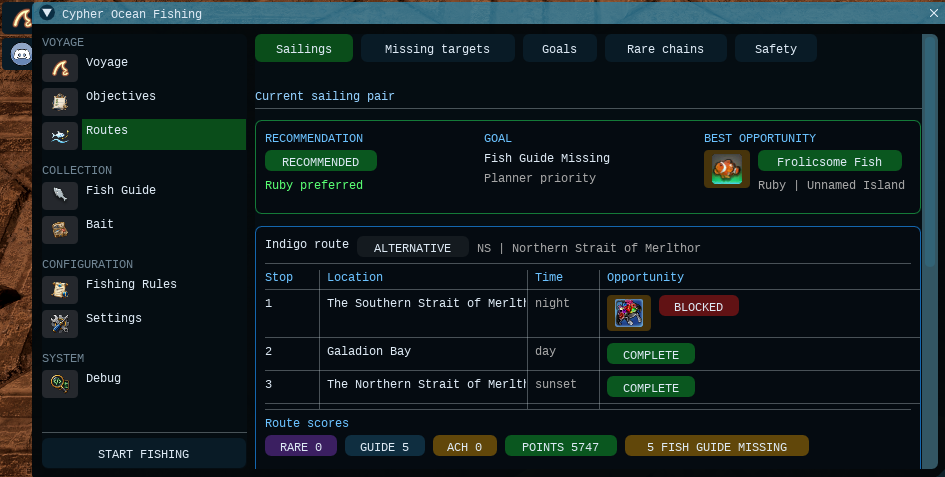
Compare the Indigo and Ruby sailings and see which fits your Goal. Once aboard, the page follows your active voyage and its remaining stops.
Sailings
Shows the preferred route, why it was chosen, stop order, time of day and target opportunities. Refresh route data updates the view.
Missing targets
Shows matching missing rare/fabled fish, their route and stop, final bait, tug, bite window and preparation chain.
Goals
Switch between Fish Guide completion, Score / Points and Achievement Focus without hunting through individual settings.
For Fish Guide completion, route choice favours the hardest actionable missing chain. Points break a tie or decide when no missing target separates the routes.
Akupara automation is disabled because stored swimbait cannot be selected automatically. The checkbox does not enable a fully automated catch.
Rare-chain options
Safety and optional extras
Fish Guide
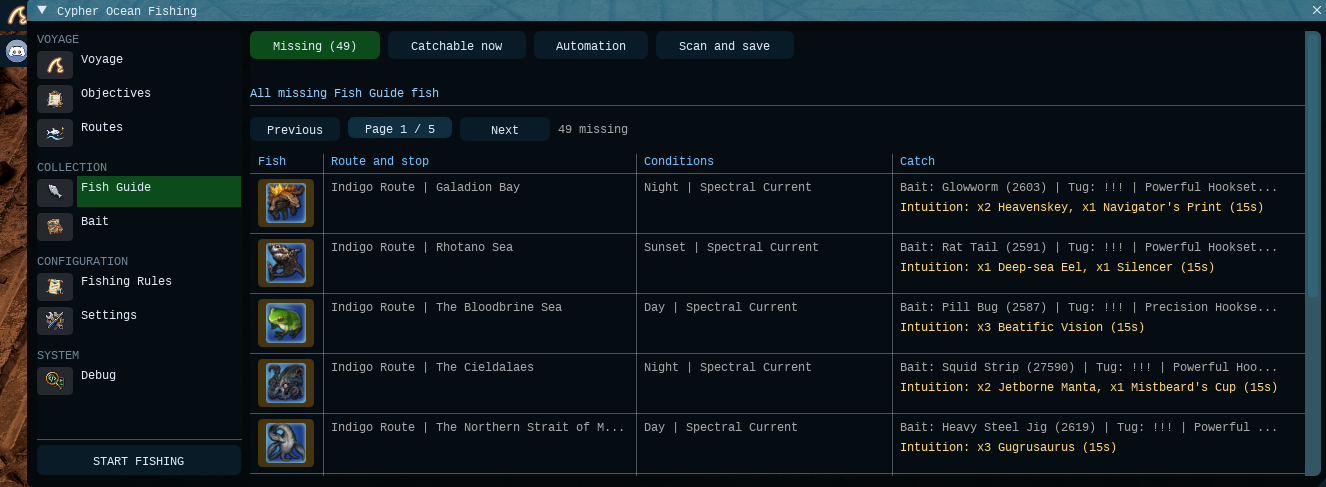
Track missing Ocean Fishing entries and let the addon work on catchable targets. Rare/fabled and Intuition or Mooch chains are handled within Fish Guide Missing mode.
Missing
Browse saved missing fish, with rare/fabled finals first. Each entry shows its route, stop, conditions and catch instructions.
Catchable now
Narrows the list to missing fish matching the current stop, time and water state. A match may still need bait, Intuition or preparation.
Scan and save
Scan and save now reads the in-game Fish Guide, saves completion data and refreshes route planning. Automatic scans also run after voyages.
Open Scan and save and refresh your entries, then enable Use Fish Guide Missing mode under Automation.
Blue / Fabled Fish targeting is included in Fish Guide Missing, not a separate Goal.
Automation options
A queued scan can wait for fishing, voyage results or bag cleanup to finish. Check the workflow status instead of repeatedly pressing Scan and save now.
Bait
Check your bait, buy the standard vendor baits and choose automatic or manual bait selection. Missing specialist bait can prevent a rare chain from being selected.
Stock
Shows counts and missing stock for 12 bait types. Refresh stock rereads your inventory.
Auto bait
The active target chooses bait for the stop, current, Intuition or preparation chain. Leave manual override off for this behaviour.
Manual bait
Select one bait you own, then enable Manual bait override. This overrides planner and achievement bait choices.
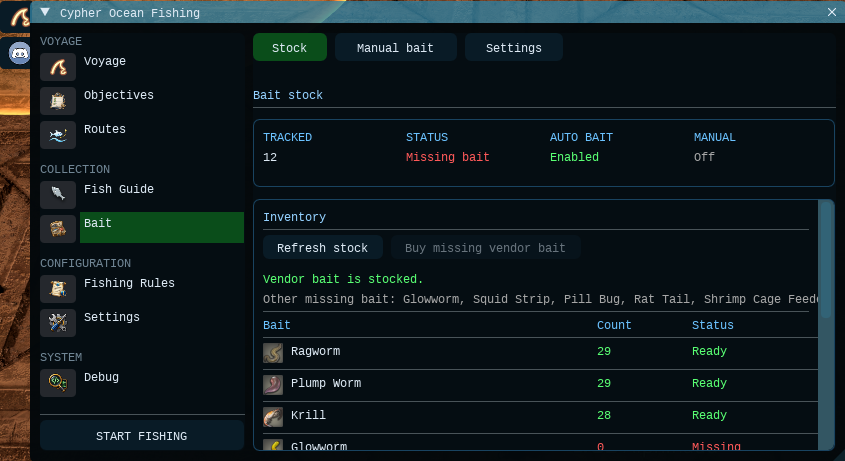
Auto bait can switch to bait you have; it does not buy every specialist bait. A manual override can stop the selected route or achievement plan from working.
Stock and buying options
Fishing Rules
Choose which fishing actions the addon may use, then adjust score and Intuition fallback behaviour. An enabled skill is permission to use it, not a command to cast it every time.
Core skills
Patience and Patience II support open-water preparation. Thaliak’s Favor converts Angler’s Art into GP when useful.
Hooksets
Allow Double Hook and Triple Hook for suitable targets. Precision Hookset and Powerful Hookset handle Patience catches using the target’s catch data.
Chains
Identical Cast repeats catches; Prize Catch supports suitable combos or source preparation. Mooch II, Makeshift Bait and Spareful Hand support specific chains.
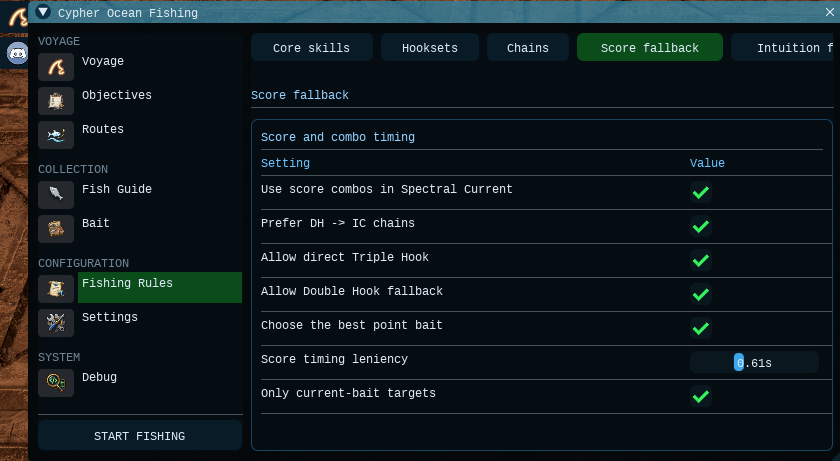
Score fallback options
Common combos
Intuition fallback
A !!! bite does not always mean Powerful Hookset. The addon uses the fish’s catch data where available. Points fallback catches broadly; an active completion target may filter bites even in open water.
Settings
Adjust the interface and access the main planner switches. Use the manual fishing runtime when you are already at the rail on an Ocean Fishing voyage and do not need voyage automation.
UI size
Scale text, controls, icons and windows from 75% to 200%. Reset returns the UI to 100%.
Planner options
Quick access to Auto bait, Timed hook windows, Allow missing Fish Guide focus and Rare and fabled first. Set your actual Goal in Voyage.
Manual fishing runtime
Start or stop only the fishing runtime. It does not register or travel for you. Voyage automation takes control of this runtime while it is running.
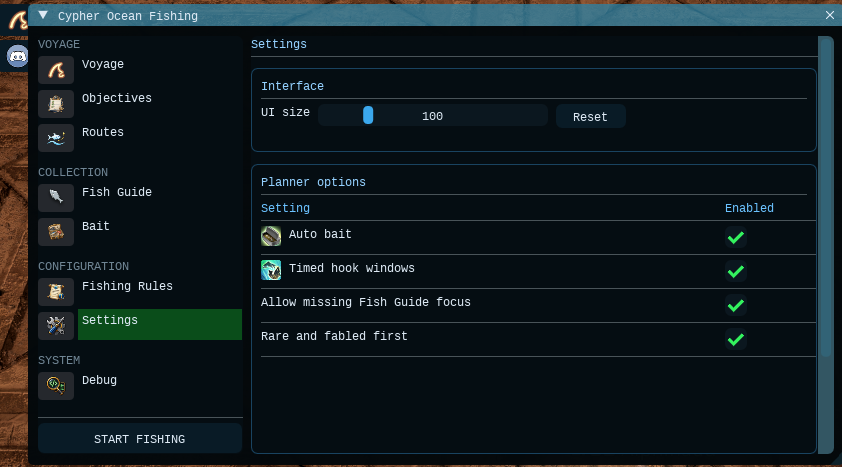
Settings explained
When something looks idle
Voyage
Cypher Ocean Fishing automatise la pêche en mer dans FFXIV. Choisissez les points, les entrées manquantes du carnet de pêche ou un haut fait : l’addon adapte les appâts, les lancers, le ferrage et les PR à cet objectif.
L’inscription et la pêche automatiques prennent en charge les itinéraires Indigo et Ruby.
Nécessite MadaoCore (GRATUIT), disponible dans la boutique Minion.
Score / Points
Cible les poissons de valeur et utilise Double Hook, Triple Hook et les combos Identical Cast aux bons moments pour augmenter le score.
Fish Guide Missing
Privilégie les poissons rares et fabuleux manquants, puis les autres entrées manquantes. Revient aux points lorsqu’aucune cible de complétion n’est disponible.
Achievement Focus
Cible les poissons du haut fait choisi plutôt que le score. Sélectionnez le haut fait dans Objectives.
Choisissez votre Goal dans Voyage, vérifiez Bait, puis appuyez sur START FISHING dans la barre latérale. STOP FISHING arrête l’automatisation des voyages.
Main
Passe en pêcheur, rejoint l’inscription, choisit l’itinéraire recommandé, accepte la mission et se place au bastingage. Répète les voyages tant que la fonction reste active.
Live fishing
Affiche l’escale, l’état des eaux, l’appât, les PR, Angler’s Art, la cible active, le combo et l’action suivante. Un poisson rare proposé n’est pas forcément la cible active.
Désactivé par défaut. Après un voyage, supprime TOUS les poissons ordinaires de pêche en mer des sacs, y compris les anciennes piles. Les poissons rares/fabuleux sont conservés.
Préparation et fin de voyage
Avant de démarrer
Objectifs
Préparez un titre ou un objectif de captures. Choisissez l’objectif, appliquez un préréglage et activez Achievement Focus. Choisir un objectif seul ne modifie pas votre Goal.
Safe achievement mode
Le préréglage de départ le plus simple : appât cible, ferrage adapté, Rest/relance et protection des PR. Les outils de contrôle des courants et les ferrages à l’aveugle restent désactivés.
Party-control mode
Pour les groupes organisés. Active davantage d’outils de contrôle des courants, dont Surface Slap et les leurres. Chum et les ferrages à l’aveugle restent initialement désactivés.
Plan
Affiche l’objectif choisi, le Goal actif, l’appât automatique et la protection des PR. Achievement Focus doit être actif pour donner la priorité à ces règles.
Choisissez un Objective, puis appuyez sur Safe achievement mode. Réservez Party-control mode aux stratégies de groupe préparées.
Objectifs disponibles
Comportement et options avancées
Un objectif peut réduire le score. Pour les hauts faits de groupe, le groupe doit toujours atteindre le nombre de captures demandé : l’addon ne contrôle que votre personnage.
Itinéraires
Comparez les départs Indigo et Ruby et voyez lequel correspond à votre Goal. À bord, la page suit le voyage en cours et les escales restantes.
Sailings
Affiche l’itinéraire préféré, la raison du choix, l’ordre des escales, le moment de la journée et les cibles possibles. Refresh route data actualise la vue.
Missing targets
Affiche les poissons rares/fabuleux manquants compatibles, leur itinéraire, l’escale, l’appât final, la touche, la fenêtre de capture et la chaîne de préparation.
Goals
Passez entre Fish Guide completion, Score / Points et Achievement Focus sans modifier chaque réglage séparément.
Pour compléter le carnet, le choix de l’itinéraire favorise la chaîne manquante la plus difficile qui peut être engagée. Les points départagent les égalités ou décident sans cible manquante distinctive.
La capture automatique d’Akupara est désactivée, car l’addon ne peut pas sélectionner automatiquement le vif stocké. La case ne permet pas une capture entièrement automatique.
Options des chaînes rares
Sécurité et options supplémentaires
Carnet de pêche
Suivez les entrées manquantes de pêche en mer et ciblez celles qui sont accessibles. Les poissons rares/fabuleux et les chaînes Intuition ou vif font partie de Fish Guide Missing.
Missing
Parcourez les entrées manquantes enregistrées, avec les poissons rares/fabuleux finaux en premier. Chaque entrée indique l’itinéraire, l’escale, les conditions et la méthode de capture.
Catchable now
Limite la liste aux poissons manquants correspondant à l’escale, au moment et à l’état des eaux. Une correspondance peut encore demander un appât, Intuition ou de la préparation.
Scan and save
Scan and save now lit le carnet en jeu, enregistre les captures déjà obtenues et actualise les itinéraires. Des scans automatiques ont aussi lieu après les voyages.
Ouvrez Scan and save et actualisez vos entrées, puis activez Use Fish Guide Missing mode dans Automation.
Le ciblage Blue / Fabled Fish fait partie de Fish Guide Missing ; ce n’est pas un Goal distinct.
Options d’automatisation
Un scan en attente peut attendre la fin de la pêche, des résultats du voyage ou du nettoyage des sacs. Consultez l’état du processus au lieu de cliquer plusieurs fois.
Appâts
Vérifiez les appâts, achetez les quatre appâts du vendeur et choisissez la sélection automatique ou manuelle. Un appât spécialisé manquant peut empêcher la sélection d’une chaîne rare.
Stock
Affiche le stock et les manques pour 12 types d’appâts. Refresh stock relit votre inventaire.
Auto bait
La cible active choisit l’appât selon l’escale, le courant, Intuition ou la préparation. Laissez la priorité manuelle désactivée pour ce fonctionnement.
Manual bait
Choisissez un appât possédé, puis activez Manual bait override. Il remplace les choix d’appât du planificateur et des objectifs.
Auto bait sélectionne un appât disponible, mais n’achète pas tous les appâts spécialisés. Une priorité manuelle peut empêcher le plan d’itinéraire ou de haut fait de fonctionner.
Stock et achats
Règles de pêche
Choisissez les actions autorisées, puis ajustez le comportement de repli pour les points et Intuition. Activer une action autorise son utilisation, sans l’imposer à chaque fois.
Core skills
Patience et Patience II aident à la préparation hors courant spectral. Thaliak’s Favor convertit Angler’s Art en PR lorsque cela est utile.
Hooksets
Autorise Double Hook et Triple Hook sur les cibles adaptées. Precision Hookset et Powerful Hookset traitent les prises sous Patience à partir des données du poisson.
Chains
Identical Cast répète les captures ; Prize Catch aide certains combos ou la préparation. Mooch II, Makeshift Bait et Spareful Hand servent à des chaînes particulières.
Options de repli pour les points
Combos courants
Repli pendant Intuition
Une touche !!! ne demande pas toujours Powerful Hookset. L’addon utilise les données du poisson quand elles existent. Le repli à points prend largement les touches ; une cible de complétion peut filtrer même hors courant spectral.
Réglages
Ajustez l’interface et les principaux réglages du planificateur. Utilisez le moteur manuel une fois au bastingage pendant un voyage de pêche en mer, sans automatisation du voyage.
UI size
Agrandit textes, commandes, icônes et fenêtres de 75 % à 200 %. Reset rétablit 100 %.
Planner options
Accès rapide à Auto bait, Timed hook windows, Allow missing Fish Guide focus et Rare and fabled first. Définissez le Goal réel dans Voyage.
Manual fishing runtime
Démarre ou arrête uniquement la pêche. Ne s’inscrit pas et ne se déplace pas pour vous. L’automatisation des voyages contrôle ce moteur lorsqu’elle est active.
Les réglages expliqués
Lorsque rien ne semble bouger
Seereise
Cypher Ocean Fishing automatisiert das Hochseeangeln in FFXIV. Wähle Punkte, fehlende Einträge im Fischverzeichnis oder einen Erfolg. Das Addon stimmt Köder, Auswerfen, Anschlagen und SP auf dieses Ziel ab.
Automatische Anmeldung und Angeln unterstützen sowohl Indigo- als auch Ruby-Routen.
Benötigt MadaoCore (KOSTENLOS) aus dem Minion-Store.
Score / Points
Zielt auf wertvolle Fische und nutzt zeitlich passende Double Hooks, Triple Hooks und Identical-Cast-Kombos für mehr Punkte.
Fish Guide Missing
Bevorzugt fehlende seltene und sagenhafte Fische, dann andere fehlende Einträge. Sind keine passenden Einträge erreichbar, fällt es auf Punkte zurück.
Achievement Focus
Zielt auf die Fische des gewählten Erfolgs statt auf Punkte. Wähle den Erfolg unter Objectives.
Wähle unter Voyage dein Goal, prüfe Bait und drücke START FISHING in der Seitenleiste. STOP FISHING beendet die Reiseautomatisierung.
Main
Wechselt zum Fischer, reist zur Anmeldung, wählt die empfohlene Route, nimmt den Inhalt an und geht an die Reling. Wiederholt Reisen, solange es aktiviert ist.
Live fishing
Zeigt Stopp, Wasserzustand, Köder, SP, Angler’s Art, aktiven Zielfisch, Kombo und nächste Aktion. Eine angezeigte seltene Gelegenheit ist nicht immer das aktive Ziel.
Standardmäßig aus. Löscht nach einer Reise ALLE gewöhnlichen Hochsee-Fische in den Taschen, auch ältere Stapel. Seltene/sagenhafte Fische bleiben erhalten.
Vorbereitung und Reiseende
Vor dem Start
Ziele
Bereite einen Titel- oder Fangziel-Lauf vor. Wähle ein Ziel, nutze eine Vorlage und aktiviere Achievement Focus. Die Zielauswahl allein ändert dein Goal nicht.
Safe achievement mode
Die einfachere Startvorlage: Zielköder, passende Bisse, Rest/erneutes Auswerfen und SP-Schutz. Strömungssteuerung und riskante blinde Haken bleiben aus.
Party-control mode
Für koordinierte feste Gruppen. Aktiviert zusätzliche Strömungswerkzeuge wie Surface Slap und Lockaktionen. Chum und riskante blinde Haken bleiben zunächst aus.
Plan
Zeigt das gewählte Ziel, das aktive Goal, automatischen Köderwechsel und SP-Schutz. Achievement Focus muss aktiv sein, damit diese Regeln Vorrang haben.
Wähle ein Objective und drücke Safe achievement mode. Nutze Party-control mode nur für eine geplante Gruppenstrategie.
Verfügbare Ziele
Verhalten und erweiterte Optionen
Erfolgsziele können Punkte kosten. Bei Gruppenerfolgen muss die Gruppe die Fangvorgabe weiterhin gemeinsam erfüllen. Das Addon steuert nur deinen Charakter.
Routen
Vergleiche Indigo- und Ruby-Abfahrten und sieh, welche zu deinem Goal passt. An Bord folgt die Seite der aktuellen Reise und ihren verbleibenden Stopps.
Sailings
Zeigt die bevorzugte Route, den Grund, die Reihenfolge der Stopps, Tageszeit und Fangmöglichkeiten. Refresh route data aktualisiert die Ansicht.
Missing targets
Zeigt passende fehlende seltene/sagenhafte Fische samt Route, Stopp, finalem Köder, Zugstärke, Bissfenster und Vorbereitungskette.
Goals
Wechsle zwischen Fish Guide completion, Score / Points und Achievement Focus, ohne jede Einstellung einzeln zu ändern.
Für das Fischverzeichnis bevorzugt die Routenwahl die schwierigste fehlende Kette, die sich angehen lässt. Punkte entscheiden bei Gleichstand oder wenn kein fehlendes Ziel die Routen unterscheidet.
Das automatische Fangen von Akupara ist deaktiviert, da gespeicherte Lebendköder nicht automatisch ausgewählt werden können. Die Checkbox ermöglicht keinen vollautomatischen Fang.
Optionen für seltene Fangketten
Sicherheit und optionale Zusatzpläne
Fischverzeichnis
Verfolge fehlende Hochsee-Einträge und arbeite an erreichbaren Zielen. Seltene/sagenhafte Fische sowie Intuition- und Lebendköderketten gehören zum Modus Fish Guide Missing.
Missing
Durchsuche gespeicherte fehlende Fische, seltene/sagenhafte Endfische zuerst. Jeder Eintrag zeigt Route, Stopp, Bedingungen und Fanganleitung.
Catchable now
Beschränkt die Liste auf fehlende Fische passend zu Stopp, Tageszeit und Wasserzustand. Ein Treffer kann noch Köder, Intuition oder Vorbereitung benötigen.
Scan and save
Scan and save now liest das Fischverzeichnis im Spiel, speichert den Fangfortschritt und aktualisiert die Routenplanung. Automatische Scans laufen auch nach Reisen.
Öffne Scan and save und aktualisiere deine Einträge. Aktiviere danach unter Automation die Option Use Fish Guide Missing mode.
Blue / Fabled Fish ist Teil von Fish Guide Missing, kein separates Goal.
Automatisierungsoptionen
Ein vorgemerkter Scan kann auf das Ende des Angelns, Reiseergebnisse oder die Taschenbereinigung warten. Prüfe den Ablaufstatus, statt wiederholt Scan and save now zu drücken.
Köder
Prüfe Köder, kaufe die Standard-Händlerköder und wähle automatischen oder manuellen Köderwechsel. Fehlende Spezialköder können die Auswahl einer seltenen Kette verhindern.
Stock
Zeigt Bestände und fehlende Mengen für 12 Köderarten. Refresh stock liest dein Inventar erneut.
Auto bait
Das aktive Ziel wählt den Köder für Stopp, Strömung, Intuition oder Vorbereitungskette. Lass die manuelle Vorrangwahl dafür ausgeschaltet.
Manual bait
Wähle einen vorhandenen Köder und aktiviere Manual bait override. Das ersetzt die Köderwahl von Planer und Erfolgsziel.
Auto bait wechselt zu vorhandenen Ködern, kauft aber nicht jeden Spezialköder. Eine manuelle Vorrangwahl kann den gewählten Routen- oder Erfolgsplan verhindern.
Bestand und Einkauf
Angelregeln
Wähle erlaubte Angelaktionen und passe Punkte- sowie Intuition-Ausweichverhalten an. Eine aktivierte Aktion darf verwendet werden, wird aber nicht zwangsläufig jedes Mal ausgeführt.
Core skills
Patience und Patience II helfen bei der Vorbereitung außerhalb von Spektralströmungen. Thaliak’s Favor wandelt Angler’s Art bei Bedarf in SP um.
Hooksets
Erlaubt Double Hook und Triple Hook für passende Ziele. Precision Hookset und Powerful Hookset behandeln Fänge unter Patience anhand der Zieldaten.
Chains
Identical Cast wiederholt Fänge; Prize Catch hilft bei passenden Kombos oder der Vorbereitung. Mooch II, Makeshift Bait und Spareful Hand dienen bestimmten Ketten.
Punkte-Ausweichoptionen
Häufige Kombos
Intuition-Ausweichverhalten
Ein !!!-Biss bedeutet nicht immer Powerful Hookset. Das Addon nutzt vorhandene Fangdaten. Punkte-Ausweichlogik nimmt viele Bisse mit; ein aktives Vervollständigungsziel kann auch außerhalb von Spektralströmungen filtern.
Einstellungen
Passe die Oberfläche und die wichtigsten Planerschalter an. Nutze die manuelle Angellaufzeit, wenn du auf einer Hochsee-Reise bereits an der Reling stehst und keine Reiseautomatisierung brauchst.
UI size
Skaliert Texte, Bedienelemente, Symbole und Fenster von 75 % bis 200 %. Reset setzt die Oberfläche auf 100 % zurück.
Planner options
Schnellzugriff auf Auto bait, Timed hook windows, Allow missing Fish Guide focus und Rare and fabled first. Das eigentliche Goal legst du unter Voyage fest.
Manual fishing runtime
Startet oder stoppt nur das Angeln. Übernimmt weder Anmeldung noch Anreise. Eine laufende Reiseautomatisierung steuert diese Laufzeit selbst.
Einstellungen erklärt
Wenn scheinbar nichts passiert
航海
Cypher Ocean FishingはFFXIVのオーシャンフィッシングを自動化します。得点、魚類図鑑の未登録魚、アチーブメントから目的を選ぶと、餌・キャスティング・フッキング・GP管理をその目的に合わせます。
IndigoとRubyの両航路で、自動申請と釣りに対応しています。
MinionストアのMadaoCore(無料)が必要です。
Score / Points
得点の高い魚を狙い、適切なタイミングのDouble Hook、Triple Hook、Identical Castコンボで得点を稼ぎます。
Fish Guide Missing
未登録のレア・幻の魚を優先し、次に通常の未登録魚を狙います。有効な図鑑対象がなければ得点狙いに戻ります。
Achievement Focus
得点よりも、選択したアチーブメントの対象魚を狙います。対象はObjectivesで選択します。
VoyageでGoalを選び、Baitを確認して、サイドバーのSTART FISHINGを押します。STOP FISHINGで航海の自動化を停止します。
Main
漁師に着替え、受付へ移動し、推奨航路への申請と突入確認を行い、船縁の釣り位置へ移動します。有効な間は航海を繰り返します。
Live fishing
現在の海域、海の状態、餌、GP、Angler’s Art、実際の対象魚、コンボ、次の行動を表示します。表示されたレア魚の機会が、現在狙っている魚とは限りません。
初期設定では無効です。航海後、バッグ内の通常のオーシャンフィッシング魚を、以前から持っていた分も含めてすべて削除します。レア・幻の魚は残します。
準備と航海後の設定
開始前の準備
目標
称号や捕獲目標の航海を設定します。対象を選び、プリセットを適用してAchievement Focusを有効にします。対象を選ぶだけではGoalは切り替わりません。
Safe achievement mode
基本のプリセットです。対象用の餌、適切なフッキング、Restと投げ直し、GP保護を使います。幻海流の制御機能とリスクのある判定なしフッキングは無効のままです。
Party-control mode
連携した固定パーティ向けです。Surface Slapやルアーなど、幻海流の制御機能を追加で有効にします。Chumとリスクのある判定なしフッキングは初期状態では無効です。
Plan
選択中の目標、現在のGoal、自動餌選択、GP保護を表示します。これらを優先させるにはAchievement Focusが必要です。
Objectiveを選んでSafe achievement modeを押します。Party-control modeは、パーティで方針を決めた場合に使ってください。
選択できる目標
動作と詳細オプション
アチーブメント狙いでは得点を犠牲にする場合があります。パーティ用の目標はパーティ全体で必要数を満たす必要があります。アドオンが操作するのは自分だけです。
航路
IndigoとRubyの航海を比較し、Goalに合う航路を確認します。乗船後は現在の航海と残りの海域を表示します。
Sailings
優先航路と選択理由、海域の順番、時間帯、対象魚の機会を表示します。Refresh route dataで更新できます。
Missing targets
条件に合う未登録のレア・幻の魚について、航路、海域、最後に使う餌、引き、ヒット時間帯、準備手順を表示します。
Goals
個々の設定を探さずに、Fish Guide completion、Score / Points、Achievement Focusを切り替えられます。
図鑑埋めでは、取り組める未登録の連続釣りのうち難しいものを優先して航路を選びます。同条件の場合や未登録魚で差がつかない場合は、得点で決まります。
Akuparaの自動釣りは無効です。保管した泳がせ餌を自動選択できないため、チェックボックスをオンにしても全自動では釣れません。
レア魚の連続釣り設定
安全設定と追加プラン
魚類図鑑
オーシャンフィッシングの未登録魚を確認し、狙える対象から進めます。レア・幻の魚やIntuition・泳がせの連続釣りもFish Guide Missingに含まれます。
Missing
保存済みの未登録魚を、レア・幻の最終魚から表示します。各項目で航路、海域、条件、釣り方を確認できます。
Catchable now
現在の海域、時間帯、海の状態に合う未登録魚に絞ります。表示された魚でも、餌やIntuition、事前準備が必要な場合があります。
Scan and save
Scan and save nowでゲーム内の魚類図鑑を読み取り、登録状況を保存して航路計画を更新します。航海後にも自動でスキャンします。
Scan and saveで登録状況を更新し、AutomationのUse Fish Guide Missing modeを有効にします。
Blue / Fabled Fishの対象魚はFish Guide Missingで扱います。独立したGoalではありません。
自動化の設定
スキャンは釣り、航海結果、バッグ整理の終了を待つ場合があります。Scan and save nowを連打せず、処理状況を確認してください。
餌
餌の在庫確認、標準の店売り餌の購入、自動・手動選択を行います。特殊な餌が不足していると、レア魚の連続釣りが選ばれない場合があります。
Stock
12種類の餌の所持数と不足を表示します。Refresh stockでインベントリを再確認します。
Auto bait
現在の対象が、海域、幻海流、Intuition、準備手順に合わせて餌を選びます。この動作には手動優先を無効にしておきます。
Manual bait
持っている餌を1つ選び、Manual bait overrideを有効にします。計画やアチーブメントの餌選択より、この設定が優先されます。
Auto baitは持っている餌に切り替えますが、すべての特殊餌を購入する機能ではありません。手動優先によって航路やアチーブメントの計画が進まなくなることがあります。
在庫と購入の設定
釣りのルール
使用を許可する釣りアクションと、得点・Intuitionの代替行動を設定します。有効にするのは使用の許可であり、毎回必ず発動させる指示ではありません。
Core skills
PatienceとPatience IIは通常の海での準備に使います。Thaliak’s Favorは必要に応じてAngler’s ArtをGPに変換します。
Hooksets
適切な対象へのDouble HookとTriple Hookを許可します。Precision HooksetとPowerful Hooksetは、対象魚のデータに基づいてPatience中の釣り上げに使います。
Chains
Identical Castは同じ魚を再度狙い、Prize Catchは対応コンボや準備を支えます。Mooch II、Makeshift Bait、Spareful Handは特定の連続釣りで使います。
得点用の代替行動
主なコンボ
Intuition中の代替行動
!!!のアタリが必ずPowerful Hooksetとは限りません。利用可能な魚のデータに従います。得点狙いの代替行動は幅広く釣りますが、図鑑の対象がいる場合は通常の海でもアタリを絞ることがあります。
設定
表示と主要な計画設定を調整します。すでにオーシャンフィッシング中の船縁にいて、航海自動化が不要な場合は手動の釣りエンジンを使います。
UI size
文字、操作項目、アイコン、ウィンドウを75%~200%に拡大縮小します。Resetで100%に戻します。
Planner options
Auto bait、Timed hook windows、Allow missing Fish Guide focus、Rare and fabled firstへすぐにアクセスできます。実際のGoalはVoyageで設定します。
Manual fishing runtime
釣りだけを開始・停止します。申請や移動は行いません。航海自動化が動作中の場合は、そちらが釣りエンジンを制御します。
設定の説明
動いていないように見えるとき
航行
Cypher Ocean Fishing 自动处理 FFXIV 出海垂钓。选择刷分、补齐鱼类图鉴或完成成就,插件就会围绕目标管理鱼饵、抛竿、提钩和采集力。
Indigo 和 Ruby 航线都支持自动报名和钓鱼。
需要安装 Minion 商店中的 MadaoCore(免费)。
Score / Points
瞄准高分鱼,在合适的咬钩时间使用 Double Hook、Triple Hook 和 Identical Cast 连招来提高分数。
Fish Guide Missing
优先补齐缺少的稀有和传说鱼,再钓其他未收录鱼。没有可执行的图鉴目标时,会转为刷分。
Achievement Focus
优先钓所选成就的目标鱼,而不是追求分数。在 Objectives 中选择成就。
在 Voyage 选择 Goal,检查 Bait,然后点击侧栏 START FISHING。STOP FISHING 会停止航行自动化。
Main
切换为捕鱼人,前往报名点,报名推荐航线,确认进入任务并移动到船边钓位。保持启用时会重复出航。
Live fishing
显示当前海域、水域状态、鱼饵、采集力、Angler’s Art 层数、实际目标、连招和下一步操作。列出的稀有鱼机会不一定就是当前目标。
默认关闭。航行结束后,会删除背包中所有普通出海垂钓鱼,包括此前已有的库存;保留稀有和传说鱼。
出发准备与航行结束选项
开始前的准备
目标
配置称号或捕获目标。选好目标、应用预设并启用 Achievement Focus。仅选择目标不会改变 Goal。
Safe achievement mode
较简单的起步预设:目标鱼饵、匹配的提钩、Rest 与重抛、采集力保护。洋流控制工具及高风险盲钩保持关闭。
Party-control mode
适合有配合的固定队。开启额外的洋流控制工具,包括 Surface Slap 和诱鱼技能。Chum 和高风险盲钩初始仍为关闭。
Plan
显示所选目标、当前 Goal、自动鱼饵和采集力保护状态。必须启用 Achievement Focus,这些规则才会优先执行。
选择 Objective,再点击 Safe achievement mode。只有预先制定了队伍策略时才使用 Party-control mode。
可选目标
行为与高级选项
成就模式可能牺牲分数。队伍成就仍需全队达到捕获要求;插件只控制你的角色。
航线
比较 Indigo 和 Ruby 的航次,查看哪条更适合 Goal。登船后,此页会跟随当前航行及剩余海域。
Sailings
显示优先航线、选择原因、海域顺序、时段和可用目标。Refresh route data 可刷新视图。
Missing targets
显示符合条件的未收录稀有或传说鱼,以及航线、海域、最终鱼饵、咬钩强度、时间窗口和准备链。
Goals
直接切换 Fish Guide completion、Score / Points 和 Achievement Focus,无需逐项查找设置。
补齐图鉴时,航线选择优先考虑当前可推进的最难未完成链。条件相同,或没有缺失目标区分航线时,再按分数选择。
Akupara 自动捕获已禁用,因为插件无法自动选择储存的活饵。勾选复选框也不能实现全自动捕获。
稀有鱼连锁选项
保护措施与额外计划
鱼类图鉴
追踪未收录的出海垂钓鱼,并处理当前可钓目标。稀有和传说鱼、Intuition 及以小钓大链都包含在 Fish Guide Missing 模式中。
Missing
查看已保存的未收录鱼,优先显示稀有和传说最终鱼。每项都列出航线、海域、条件和捕获方法。
Catchable now
筛选符合当前海域、时段和水域状态的未收录鱼。符合这些条件的鱼仍可能需要鱼饵、Intuition 或前置准备。
Scan and save
Scan and save now 读取游戏内鱼类图鉴、保存收录进度并刷新航线规划。航行结束后也会自动扫描。
在 Scan and save 中更新图鉴,再到 Automation 启用 Use Fish Guide Missing mode。
Blue / Fabled Fish 目标包含在 Fish Guide Missing 中,不是单独的 Goal。
自动化选项
排队中的扫描可能需要等待钓鱼、航行结算或背包清理完成。查看流程状态,不要反复点击 Scan and save now。
鱼饵
检查鱼饵、购买标准商店鱼饵,并选择自动或手动换饵。缺少专用鱼饵可能导致稀有鱼链无法被选中。
Stock
显示 12 种鱼饵的数量和缺货情况。Refresh stock 重新读取背包。
Auto bait
当前目标会按海域、幻海流、Intuition 或准备链选择鱼饵。要使用此行为,请保持手动覆盖关闭。
Manual bait
选择一种已有鱼饵,再启用 Manual bait override。它会覆盖规划器和成就目标的鱼饵选择。
Auto bait 可以换成已有鱼饵,但不会购买所有专用鱼饵。手动覆盖可能导致所选航线或成就计划无法正常进行。
库存与购买选项
钓鱼规则
选择插件获准使用的钓鱼技能,再调整刷分及 Intuition 后备行为。启用技能表示允许使用,并不代表每次都强制施放。
Core skills
Patience 和 Patience II 用于普通海域的准备。Thaliak’s Favor 会在合适时将 Angler’s Art 转为采集力。
Hooksets
允许对合适目标使用 Double Hook 和 Triple Hook。Precision Hookset 与 Powerful Hookset 根据目标鱼数据处理 Patience 状态下的提钩。
Chains
Identical Cast 重复捕获同种鱼;Prize Catch 用于适合的连招或前置准备。Mooch II、Makeshift Bait 和 Spareful Hand 支持特定连锁。
刷分后备选项
常见连招
Intuition 后备行为
!!! 咬钩不一定使用 Powerful Hookset。插件会采用可用的目标鱼捕获数据。刷分后备会广泛提钩,而图鉴目标即使在普通海域也可能过滤咬钩。
设置
调整界面与主要规划开关。如果已经在出海垂钓船边就位,且不需要航行自动化,可以使用手动钓鱼运行模块。
UI size
将文字、控件、图标和窗口缩放到 75%~200%。Reset 恢复到 100%。
Planner options
快速设置 Auto bait、Timed hook windows、Allow missing Fish Guide focus 和 Rare and fabled first。实际 Goal 在 Voyage 选择。
Manual fishing runtime
只开始或停止钓鱼,不会替你报名或移动。航行自动化运行期间会接管这个钓鱼模块。
设置说明
看起来没动时
항해
Cypher Ocean Fishing은 FFXIV 먼바다낚시를 자동화합니다. 점수, 낚시수첩 미등록 물고기 또는 업적을 선택하면 그 목표에 맞춰 미끼, 낚싯대 던지기, 낚아채기와 GP를 관리합니다.
Indigo와 Ruby 항로 모두 자동 참가 신청과 낚시를 지원합니다.
Minion 상점의 MadaoCore(무료)가 필요합니다.
Score / Points
점수가 높은 물고기를 노리고, 알맞은 입질 시간에 Double Hook, Triple Hook과 Identical Cast 연계를 사용해 점수를 올립니다.
Fish Guide Missing
미등록 희귀·전설 물고기를 먼저 노린 뒤 다른 미등록 항목을 채웁니다. 진행할 수 있는 수첩 대상이 없으면 점수 낚시로 돌아갑니다.
Achievement Focus
점수보다 선택한 업적의 대상 물고기를 우선합니다. 업적은 Objectives에서 선택하세요.
Voyage에서 Goal을 선택하고 Bait를 확인한 뒤, 사이드바의 START FISHING을 누르세요. STOP FISHING은 항해 자동화를 중지합니다.
Main
어부로 변경하고 접수처로 이동해 추천 항로를 신청한 뒤 입장을 확인하고 난간의 낚시 위치로 이동합니다. 켜져 있는 동안 항해를 반복합니다.
Live fishing
현재 해역, 물 상태, 미끼, GP, Angler’s Art 중첩, 실제 대상, 연계와 다음 행동을 표시합니다. 표시된 희귀 물고기 기회가 항상 현재 대상인 것은 아닙니다.
기본값은 꺼짐입니다. 항해 후 가방에 있는 일반 먼바다낚시 물고기를 기존 보유분까지 모두 삭제합니다. 희귀·전설 물고기는 남깁니다.
준비 및 항해 후 설정
시작 전 준비
목표
칭호나 포획 목표 항해를 설정합니다. 대상을 고르고 프리셋을 적용한 다음 Achievement Focus를 켜세요. 대상 선택만으로는 Goal이 바뀌지 않습니다.
Safe achievement mode
시작하기 쉬운 프리셋입니다. 대상 미끼, 맞는 입질, Rest와 재시전, GP 보호를 사용합니다. 환해류 제어와 위험한 무조건 낚아채기는 꺼진 상태를 유지합니다.
Party-control mode
호흡을 맞춘 고정 파티용입니다. Surface Slap과 유인 기술 등 환해류 제어 기능을 추가로 켭니다. Chum과 위험한 무조건 낚아채기는 처음에는 꺼져 있습니다.
Plan
선택한 목표, 현재 Goal, 자동 미끼와 GP 보호 상태를 표시합니다. 이 규칙을 우선하려면 Achievement Focus가 활성화되어야 합니다.
Objective를 고르고 Safe achievement mode를 누르세요. Party-control mode는 파티 전략을 미리 정한 경우에만 사용하세요.
선택 가능한 목표
동작 및 고급 옵션
업적을 노리면 점수가 낮아질 수 있습니다. 파티 업적은 여전히 파티 전체가 요구 포획 수를 채워야 합니다. 애드온은 자신의 캐릭터만 조작합니다.
항로
Indigo와 Ruby 항해를 비교해 Goal에 맞는 항로를 확인합니다. 승선 후에는 현재 항해와 남은 해역을 따라 표시합니다.
Sailings
선호 항로, 선택 이유, 해역 순서, 시간대와 대상 기회를 표시합니다. Refresh route data로 갱신하세요.
Missing targets
조건에 맞는 미등록 희귀·전설 물고기의 항로, 해역, 최종 미끼, 입질 강도, 시간 범위와 준비 과정을 표시합니다.
Goals
개별 설정을 찾아다니지 않고 Fish Guide completion, Score / Points, Achievement Focus를 전환합니다.
수첩 완성 항로는 현재 진행할 수 있는 미완성 연계 중 가장 어려운 것을 우선합니다. 조건이 같거나 미등록 대상이 항로를 구분하지 못하면 점수로 결정합니다.
보관된 생미끼를 자동으로 선택할 수 없어 Akupara 자동 포획은 비활성화되어 있습니다. 체크박스를 켜도 완전 자동으로 포획하지 않습니다.
희귀 물고기 연계 옵션
보호 설정 및 추가 계획
낚시수첩
먼바다낚시 미등록 물고기를 추적하고 현재 잡을 수 있는 대상부터 진행합니다. 희귀·전설 물고기와 Intuition·생미끼 연계는 Fish Guide Missing 모드에 포함됩니다.
Missing
저장된 미등록 물고기를 희귀·전설 최종 물고기부터 확인합니다. 각 항목에는 항로, 해역, 조건과 포획 방법이 나옵니다.
Catchable now
현재 해역, 시간대와 물 상태에 맞는 미등록 물고기만 표시합니다. 표시된 물고기도 미끼, Intuition 또는 준비가 더 필요할 수 있습니다.
Scan and save
Scan and save now는 게임 내 낚시수첩을 읽어 완료 상태를 저장하고 항로 계획을 갱신합니다. 항해 후에도 자동으로 스캔합니다.
Scan and save에서 수첩을 갱신한 다음 Automation의 Use Fish Guide Missing mode를 켜세요.
Blue / Fabled Fish 대상은 Fish Guide Missing에 포함되며 별도의 Goal이 아닙니다.
자동화 옵션
대기 중인 스캔은 낚시, 항해 결과 또는 가방 정리가 끝날 때까지 기다릴 수 있습니다. Scan and save now를 반복해서 누르기보다 진행 상태를 확인하세요.
미끼
미끼를 확인하고 기본 상점 미끼를 구매하며 자동·수동 선택을 설정합니다. 특수 미끼가 없으면 희귀 물고기 연계가 선택되지 않을 수 있습니다.
Stock
12종 미끼의 보유 수량과 부족 상태를 표시합니다. Refresh stock으로 가방을 다시 읽습니다.
Auto bait
현재 대상이 해역, 환해류, Intuition 또는 준비 과정에 맞춰 미끼를 고릅니다. 이 동작을 쓰려면 수동 우선 설정을 꺼두세요.
Manual bait
보유 미끼 하나를 고르고 Manual bait override를 켜세요. 계획기와 업적 목표의 미끼 선택보다 우선합니다.
Auto bait는 보유한 미끼로 바꾸지만 모든 특수 미끼를 구매하지는 않습니다. 수동 우선 설정은 선택한 항로 또는 업적 계획을 방해할 수 있습니다.
재고 및 구매 옵션
낚시 규칙
허용할 낚시 기술을 고르고 점수 및 Intuition 대체 동작을 조정합니다. 기술을 켜는 것은 사용 허가이며 매번 반드시 사용하라는 뜻이 아닙니다.
Core skills
Patience와 Patience II는 일반 해역의 준비를 돕습니다. Thaliak’s Favor는 필요할 때 Angler’s Art를 GP로 바꿉니다.
Hooksets
적절한 대상에 Double Hook과 Triple Hook을 허용합니다. Precision Hookset과 Powerful Hookset은 대상 물고기 데이터에 따라 Patience 상태의 포획에 사용됩니다.
Chains
Identical Cast는 같은 어종을 다시 노립니다. Prize Catch는 적합한 연계나 준비에 쓰입니다. Mooch II, Makeshift Bait와 Spareful Hand는 특정 연계에 사용됩니다.
점수 대체 옵션
주요 연계
Intuition 대체 동작
!!! 입질이라고 항상 Powerful Hookset을 쓰는 것은 아닙니다. 애드온은 사용 가능한 물고기 포획 데이터를 따릅니다. 점수 대체 로직은 폭넓게 낚지만 수첩 대상은 일반 해역에서도 입질을 거를 수 있습니다.
설정
화면과 주요 계획 설정을 조절합니다. 이미 먼바다낚시 항해 중 난간에 서 있고 항해 자동화가 필요 없다면 수동 낚시 실행 모듈을 사용하세요.
UI size
글자, 설정 항목, 아이콘과 창 크기를 75%~200%로 조절합니다. Reset은 100%로 되돌립니다.
Planner options
Auto bait, Timed hook windows, Allow missing Fish Guide focus, Rare and fabled first에 빠르게 접근합니다. 실제 Goal은 Voyage에서 설정하세요.
Manual fishing runtime
낚시만 시작하거나 중지합니다. 참가 신청이나 이동은 하지 않습니다. 항해 자동화가 켜져 있으면 해당 기능이 낚시 실행을 제어합니다.