Intelligent crafting, gathering and order automation
Minbeth takes care of the fiddly work behind larger crafting and gathering jobs. Tell it what you want, how many you need and which sources it is allowed to use. It will then work backwards through the full order.
It checks your bags and retainer stock, works out recipes and materials, plans gathering and fishing, handles approved purchases, turns in collectables, repairs gear and switches jobs when needed.
In simple terms:
Minbeth's major systems include:
Minbeth will not use every source by default. You choose which sources are allowed, which ones should be used first and whether it is allowed to spend gil.
Optional integrations include:
For smooth automation, also make sure that:
For your first run, it is best to keep things simple:
Start with one small order. Once you know your gearsets, locations and settings are working properly, you can move on to larger batches and timed materials.
Minbeth does more than open the final recipe and press Craft. It works through the recipe tree and adds everything needed to finish the order.
A simplified plan looks like this:
Final item
-> required intermediate crafts
-> required gathered materials
-> required fish, vendor items or exchanges
-> available inventory and retainer stock
-> remaining shortfalls
-> executable task list
-> final synthesis
At each stage, Minbeth checks what you already have before adding more work. Depending on your settings, it can count:
Sub-crafts are always completed before the recipe that needs them. Source priorities only change how an item is obtained. They do not let the final craft skip work that still needs doing.
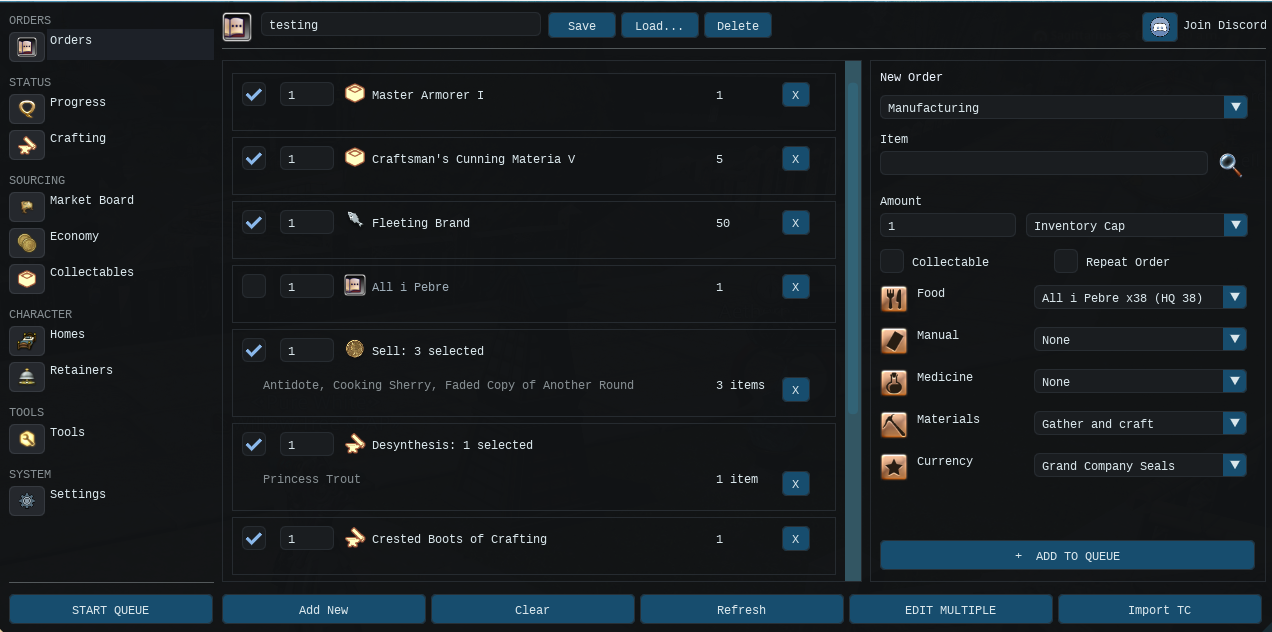
The Orders page is where you tell Minbeth what you want it to do. Add the item, choose the amount and set when the order should run.
You can create Manufacturing, Sell, Discard and Desynthesis orders. You can also set quantities, choose the crafting result, group jobs into numbered batches, repeat regular jobs and save order lists as profiles.
You choose the end result. Minbeth works out the jobs needed to get there. The order number decides which jobs are done first.
A Manufacturing order may include:
Search by item name, select the correct result and enter the required amount. Minbeth then resolves the item's recipe, unlock requirements and dependencies.
| Mode | What it means | Useful for |
|---|---|---|
| Inventory Cap | Produce only enough to bring carried inventory up to the entered amount. Existing stock reduces the work. | Keeping a fixed amount ready. |
| Replenish | Produce the entered amount in addition to stock already held. | Restocking after use or producing a fresh batch. |
| Retainer Sales | Plan production against known retainer sale quantities so the configured amount can be maintained. | Keeping sale stock topped up. |
Be careful when switching between Inventory Cap and Replenish. A target of 100 means very different things in each mode.
The Run Order field controls priority between orders:
For example:
| Run Order | Example | Result |
|---|---|---|
| 1 | Crafting food and medicine | Completed first. |
| 2 | Two gear pieces | Planned and completed as the next batch. |
| 3 | Sale stock | Begins after the gear batch. |
Rows may also be enabled, disabled and rearranged without deleting the underlying order.
Manufacturing orders can be set to repeat. This works well for regular restocking, but make sure the quantity mode is correct. A repeating Replenish order asks for another full batch every time. An Inventory Cap order stops once the target amount is in your inventory.
Order sets can be saved as profiles in Minbeth's Profiles folder. Use profiles for regular production lists such as:
Profiles can be saved, loaded, refreshed and deleted from the Orders interface.
Minbeth can import the Items section of a Teamcraft list. A line such as:
1x Crested Gloves of Crafting
becomes a Manufacturing order. Imported entries can be assigned to the chosen run order before the queue begins.
A Sell order sells selected items to a normal shop NPC. It is not Market Board selling.
You can select items from your inventory and from cached retainer stock. Retainer items are withdrawn together when possible, so the bell is not opened for every single stack. You can also prepare the selection before the items have been made.
Price-based automatic selection may use Universalis limits, including:
When both checks are enabled, both conditions must pass.
Discard orders permanently destroy selected inventory items. They use a similar item-selection interface to Sell orders and may also use price thresholds to help identify low-value clutter.
Discarding is irreversible. Check the selected item names, quantities and thresholds carefully before starting the queue.
Desynthesis orders process eligible carried items. Minbeth may travel to a saved crafting home first when that option is enabled, then desynthesise the selected items and return control to the queue.
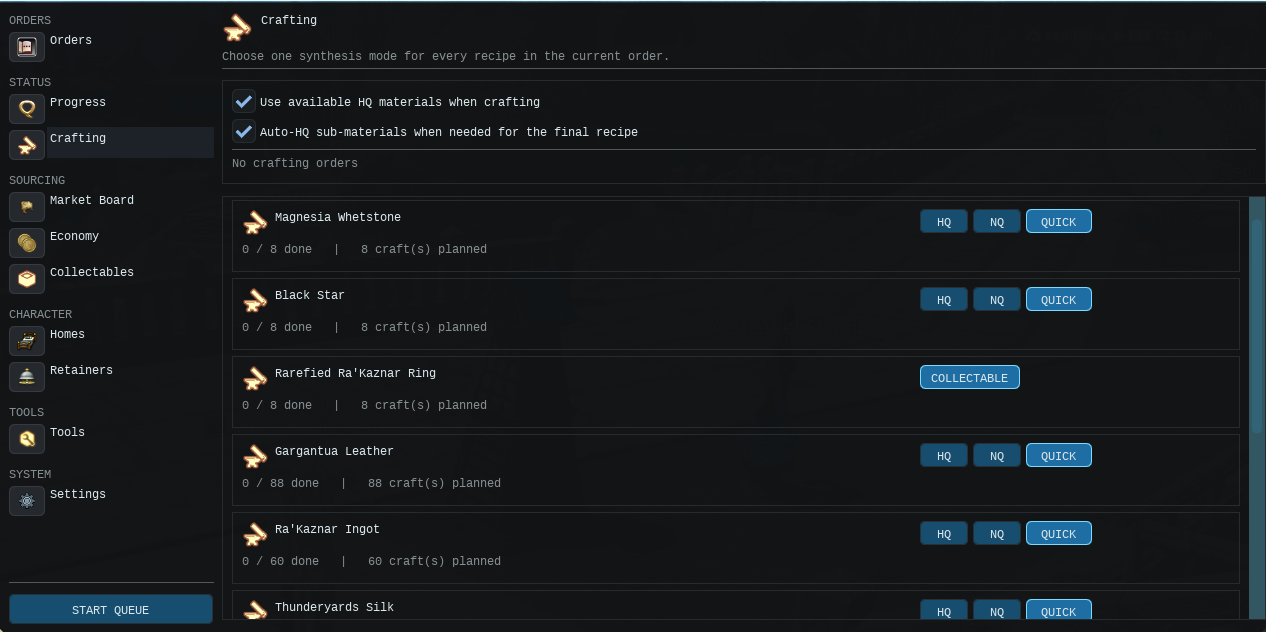
The Crafting page contains the main settings used by Manufacturing orders. This includes Cypher Craft, HQ materials, saved crafting homes and the food, medicine or manuals used while solving a recipe.
Some orders can override these choices, but this page provides the normal defaults.
Check these settings before starting an expensive endgame craft. Changes to your stats, food, medicine or HQ material settings can change how many HQ sub-items Cypher Craft needs for the final recipe.
The Crafting page lets you choose an mode for each recipe:
| Mode | Behaviour |
|---|---|
| HQ | Plans and executes the recipe with a simulator-proven full-quality route when possible. |
| NQ | Completes the recipe without requiring an HQ result. |
| Quick | Uses Quick Synthesis when the recipe and character support it. |
| Collectable | Uses collectable synthesis behaviour for applicable recipes. |
Minbeth starts Cypher Craft only while an actual synthesis is active and manages its lifecycle as the queue enters and leaves crafting.
For difficult recipes, Cypher Craft automatically decides how many intermediate items must be crafted as HQ in order to HQ the final recipe.
This does not mean every ingredient will be made HQ. Minbeth asks Cypher Craft to work out the smallest number of HQ sub-items needed for your recipe and current setup.
It works like this:
An illustrative example:
A final recipe needs four crafted sub-items. Cypher Craft works out that only two need to be HQ for the final craft to reach full quality. Minbeth makes those two as HQ and leaves the other two NQ, saving time and materials.
The exact count depends on the final recipe, ingredient quality values, job stats, consumables and the route Cypher can prove.
Harder crafts can have several costly sub-crafts. Making all of them HQ wastes time, crystals and materials. Making too few may leave the final recipe short of full quality.
Minbeth tries to get the balance right:
For difficult HQ crafts, Minbeth may switch to the correct crafting job and let Cypher Craft check the real stats and selected consumables.
The queue may show a preparation state while this happens. This is normal. Minbeth is checking that the final craft can be completed safely before it uses expensive materials.
If Minbeth cannot read the recipe properly, check the character stats or find a proven Cypher route, it will not assume NQ materials are safe.
Depending on the situation, it will:
Collectable and rarefied crafts do not consume HQ sub-materials merely to create starting quality. Their planning follows collectable-specific logic instead.
The main HQ-related options are:
The Crafting and Progress pages show the resulting HQ requirement. Hover information explains why a particular count is required.
Quick Synthesis is handled in batches when possible. Minbeth also watches for damaged gear and stalled crafts. It can restart Cypher Craft or repair at a safe point before carrying on.
Minbeth can directly gather planned materials with Miner and Botanist when those source groups are enabled.
It uses saved gearsets, known gathering data and live node scanning to:
The gathering planner distinguishes ordinary materials from restricted windows such as:
Timed work appears on the Schedule tab with Eorzea Time windows, location and current status. Minbeth can complete other useful work while waiting, then move towards the timed material using the configured lead time.
When Smart GP is enabled, Minbeth decides when GP is worth spending instead of using every available action straight away.
It can:
For gatherer collectables, Minbeth uses the actions that suit the selected item. Maximise Node tells it to get as much useful value as it can from each limited node.
When inventory space becomes low, Minbeth can divert at a safe boundary, turn in carried collectables, free space and resume the original route.
Minbeth can automatically choose suitable Purple or Orange gatherer-scrip collectables. It rotates through available timed windows and uses hubs that contain both:
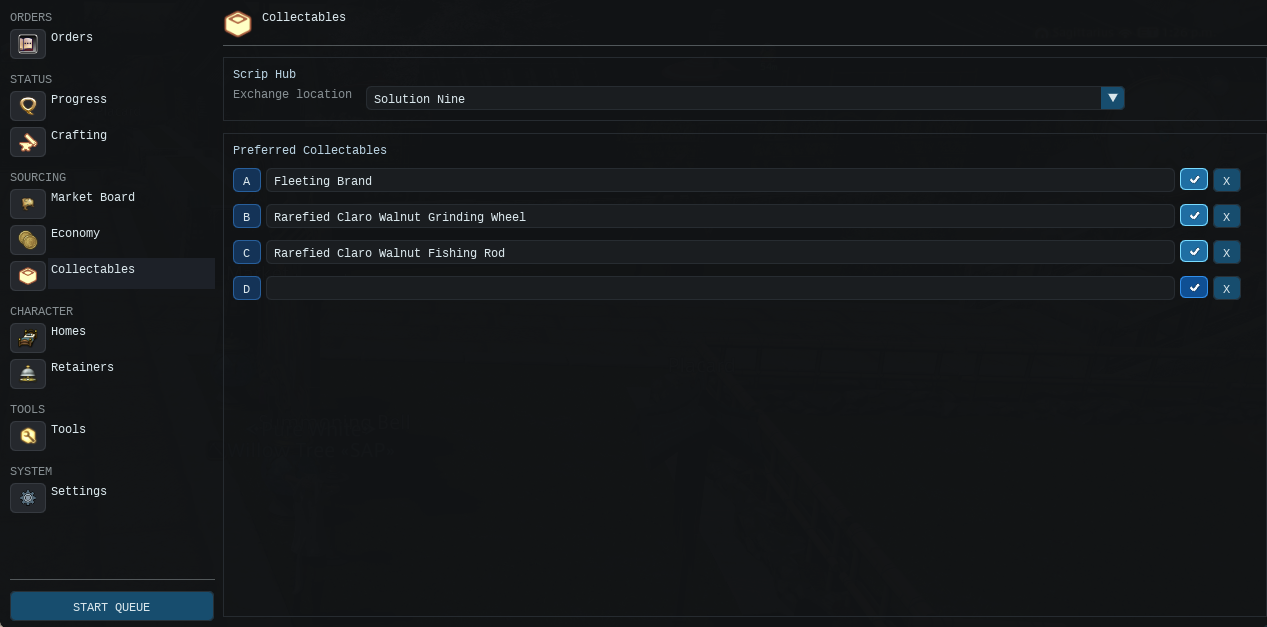
The Collectables page also provides preferred-item slots. Leave them blank for automatic selection, or fill them when you want Minbeth to favour particular collectables.
Before reaching the 4,000-scrip cap, Minbeth can spend scrips on planned exchange items and then continue gathering.
When an order needs an aethersand or another reduction result, Minbeth may plan the complete chain:
This keeps aethersands inside the same order instead of leaving them as a separate job for you to sort out.
Elemental catalysts are treated as planned resources. The Progress page can offer a location selector where several gathering areas are known. Leave the selection automatic or choose a preferred area for that element.
Fishing is divided into rod fishing and spearfishing, with each method using its own route and decision logic.
For supported fish, Minbeth can use:
The Progress page can provide a bait override when several valid options exist.
If bait is missing, Minbeth can add it to the plan like any other material. When the source is known and enabled, it can get the bait from a vendor, gathering route, the Market Board or another supported source.
You may also configure stock targets so the route does not arrive with only one piece of bait and immediately run dry.
Fishing in one spot for too long can cause fatigue. Minbeth can move to another known bank after a set period, usually between casts. It will not interrupt an active catch just because the timer has run out.
For supported spearfishing targets, Minbeth can:
Restricted fish and relevant availability windows can also appear in the Schedule view.
The Tools menu contains the extra setup pages used by Minbeth. Orders tell it what to make. Tools tells it which gearsets, locations and methods it should use.
The menu includes:
Most of these tools are for setup rather than making an item directly. Check them before your first large order, after changing gearsets, after learning new books or whenever you change how materials should be sourced.
Open Tools > Order Priorities to decide how Minbeth should obtain missing materials.
The default source groups include:
| Source | Purpose | Notes |
|---|---|---|
| Purchase | Vendor purchases and explicitly approved Market Board buys. | Market Board items still require individual approval. |
| Gather | Miner and Botanist materials. | Includes direct nodes and cluster patrols. |
| Fisher | Rod fishing and spearfishing. | Uses bait, skill and Mooch information where known. |
| Carpenter | Carpenter sub-crafts. | Direct synthesis through Cypher Craft. |
| Blacksmith | Blacksmith sub-crafts. | Direct synthesis through Cypher Craft. |
| Armorer | Armorer sub-crafts. | Direct synthesis through Cypher Craft. |
| Goldsmith | Goldsmith sub-crafts. | Direct synthesis through Cypher Craft. |
| Leatherworker | Leatherworker sub-crafts. | Direct synthesis through Cypher Craft. |
| Weaver | Weaver sub-crafts. | Direct synthesis through Cypher Craft. |
| Alchemist | Alchemist sub-crafts. | Direct synthesis through Cypher Craft. |
| Culinarian | Culinarian sub-crafts. | Direct synthesis through Cypher Craft. |
| Exchange | Scrip and token exchanges. | May include collectable turn-ins first. |
| Mob Drops | Supported monster-drop farming. | Optional and disabled by default. |
Use the arrow controls to move preferred sources up or down, and disable any source you do not want used.
Priority only changes which source Minbeth tries first. It will still finish required sub-crafts before the final recipe and it will still ask for Market Board approval.
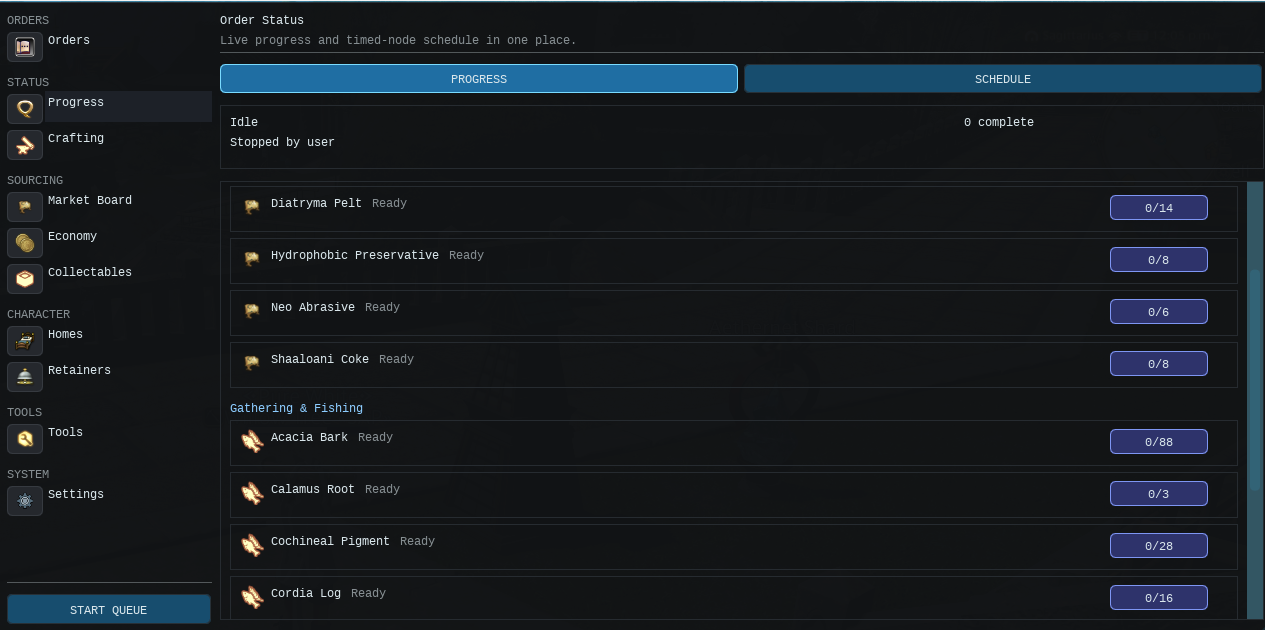
The Progress page shows the work behind each order. A single finished item may need several ingredients, sub-crafts, gathering trips, fish, purchases, retainer withdrawals or exchanges. They are all shown here.
Check this page before starting a large queue to make sure every important material has a valid source. While the queue is running, it also helps explain why Minbeth is waiting. It may be waiting for a timed node, Cypher Craft, GP recovery or missing bait rather than being stuck.
For each requirement it can show:
Requirements that are already satisfied are normally hidden so the page focuses on work that remains.
Fishing estimates take longer to appear because catch rates can vary. Minbeth waits for enough casts before showing an ETA, rather than guessing from one lucky catch.
The Schedule tab shows upcoming timed work. It can include:
Use it to see why Minbeth is waiting and what it intends to do next.
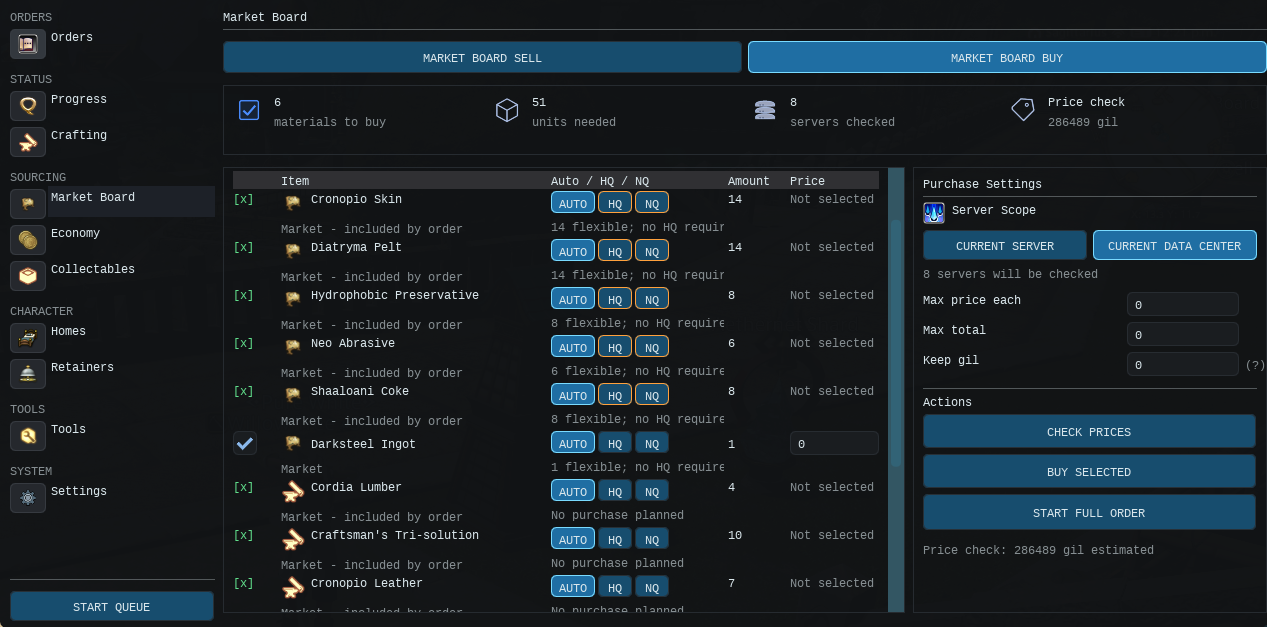
The Market Board page gives you control over what Minbeth is allowed to buy. Missing items are not bought automatically. You choose the items, set the price limits and decide how much gil must be kept back.
Always check the quantity, world or data centre, unit price and estimated total before pressing Buy Selected or starting a full order with buying enabled.
Vendor purchases use separate settings. Known vendor items can be bought automatically when that option is enabled. Market Board items still need your approval and must stay within your limits.
Known vendor items can be purchased automatically when vendor buying is enabled. Minbeth travels to the recorded vendor and buys the amount still required by the plan.
You can place vendor buying ahead of gathering. This can save time on cheap ingredients, but leave gathering first if you would rather collect them yourself.
Market Board spending needs your approval. Minbeth will not quietly buy every missing item.
The Market Board page provides selection tools such as:
You must also enable Allow Buying.
For every selected item, set an acceptable unit-price cap. Global safeguards include:
A value of zero disables the relevant limit, so do not leave zeroes unintentionally when you expect a cap.
Market checking may be limited to:
When data-centre scope is used, Minbeth can compare selected worlds and form a cross-world purchase plan. The interface shows the cheapest known world, unit price, shortfall, estimated total and the amount actually spent.
Available actions include:
If a selected listing is no longer available, Continue on Market Failure lets Minbeth carry on with other jobs instead of stopping the whole queue straight away.
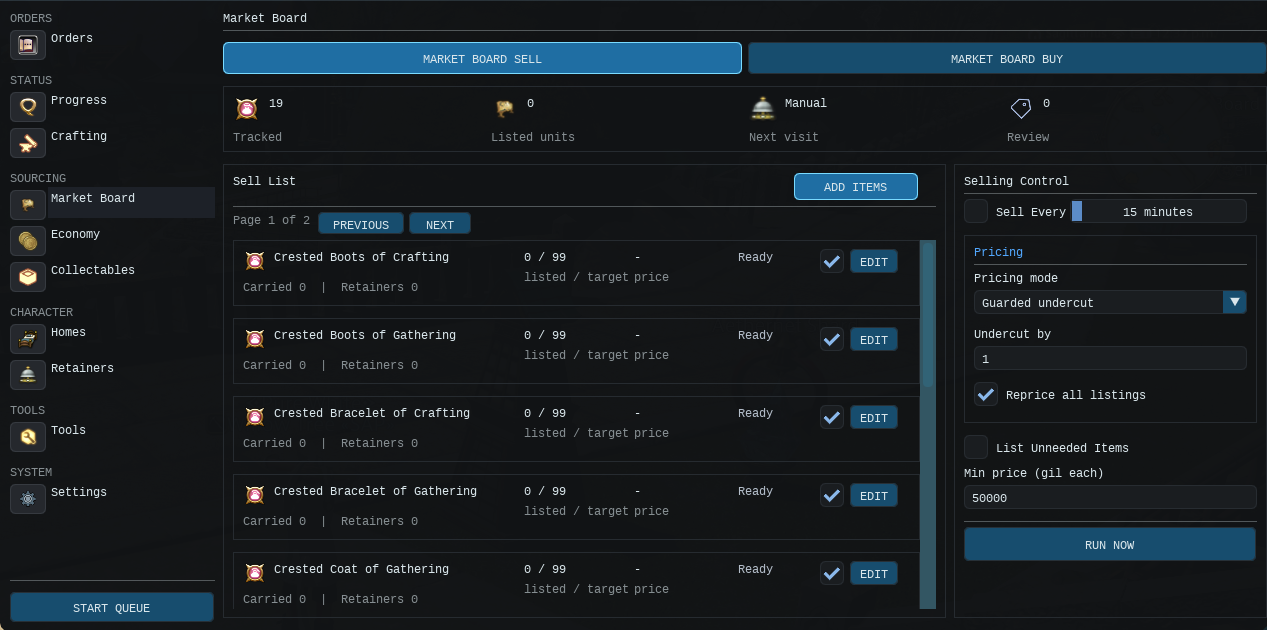
Automated Market Board selling is not currently available in this build. The Sell order sends items to an ordinary shop NPC. The Retainer Sales quantity mode can plan production against known sale stock, but it should not be confused with an automatic listing system.
The Collectables page controls gatherer collectables and scrip routes. Leave the preferred slots empty and Minbeth will choose a suitable Purple or Orange scrip item. You can also choose a specific collectable when you want it to follow the same route each time.
This is also used when a Manufacturing order needs an item bought with scrips. Minbeth can gather the collectable, visit the appraiser, turn it in, check the scrip total and buy the exchange item before returning to the original order.
Minbeth can combine several steps into one route:
A valid automated scrip hub needs both the appraiser and exchange required by the route.
Preferred collectable slots are optional. Leave them empty to allow automatic selection from currently eligible Purple or Orange scrip items.
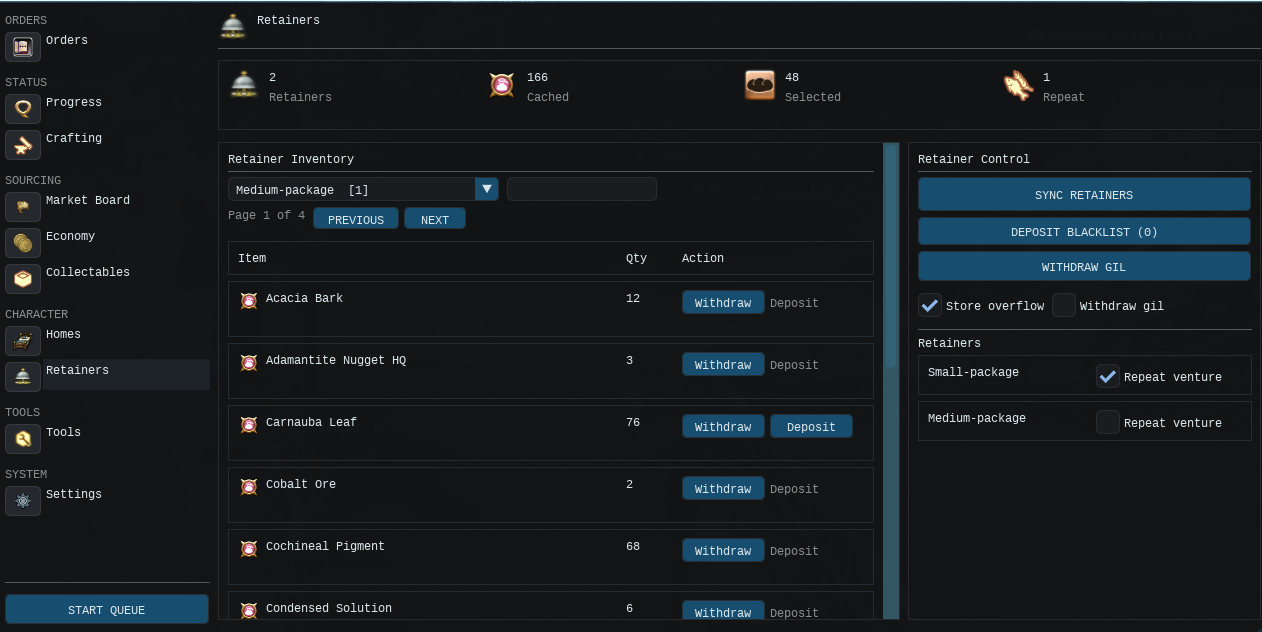
The Retainers page shows a cached list of the items stored on your retainers. Minbeth can use this stock before it gathers, crafts or buys replacements.
Use Sync All after moving a lot of items by hand so the cache stays up to date. You can search stored items, refresh one retainer, withdraw or deposit stock, assign roles, repeat supported ventures and set up overflow storage. Where possible, Minbeth handles several items during the same bell visit.
Use Sync All to visit known retainers and refresh their inventory information. Individual retainers can also be refreshed separately.
The cached view includes information such as:
A cache is only as accurate as its last sync. Refresh it after large manual inventory changes.
When enabled, the planner counts cached retainer stock before gathering, crafting or buying replacements. During execution Minbeth withdraws the required amount, subject to inventory capacity, and then continues with the remaining shortfall.
This is handy for materials such as ores, cloth, lumber, bait and materia.
The interface can search retainer inventory and withdraw or deposit selected items. Operations are grouped sensibly so Minbeth does not need to reopen the bell for every single unit.
Retainers may be assigned organisational roles such as:
When low-space overflow handling is enabled, Minbeth can move carried items that are not required by the current order into a Materials retainer. Shards, crystals and clusters are protected from casual overflow movement.
A retainer may be set to repeat its current venture. Minbeth can collect the result and reassign the same venture when visiting the bell. Repeat Now performs the action on demand for an eligible retainer.
Minbeth can withdraw gil from cached retainers, either manually or as part of the configured automation flow.
Retainer balancing and rules are limited in this build. The page may show suggested moves or previews, but it will not automatically reorganise everything. Treat these parts as planning tools for now.
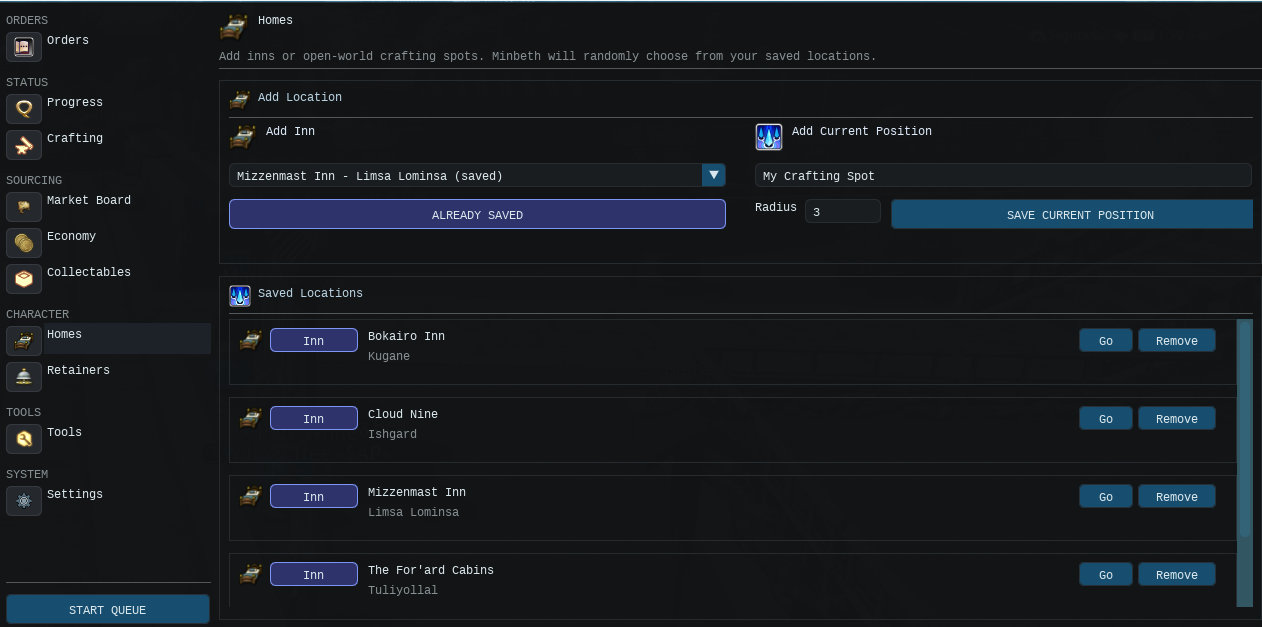
Homes are safe locations Minbeth can use before longer crafting or utility work.
You can:
Choose a crafting home that is easy to reach, fairly quiet and clear of awkward scenery. Minbeth can travel there before crafting, desynthesis or melding when the setting is enabled.
Open Tools > Gearsets and import the character's current saved gearsets.
Minbeth stores the relationship between a job and its gearset slot so it can switch jobs during a plan. Gearsets are important for:
After deleting or rearranging in-game gearsets, refresh Minbeth's gearset mapping before starting a complicated queue.
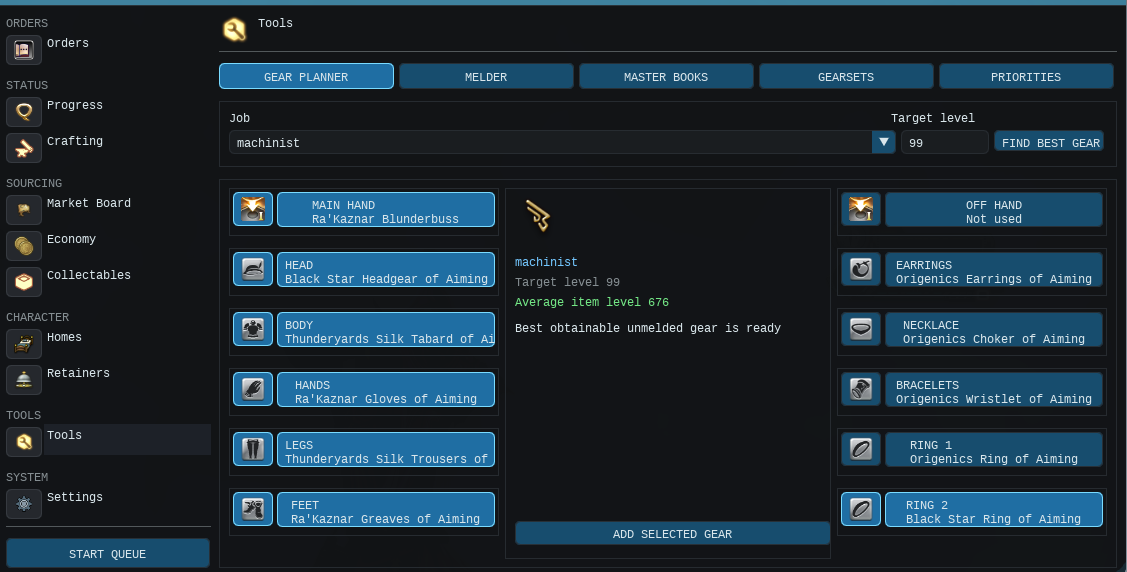
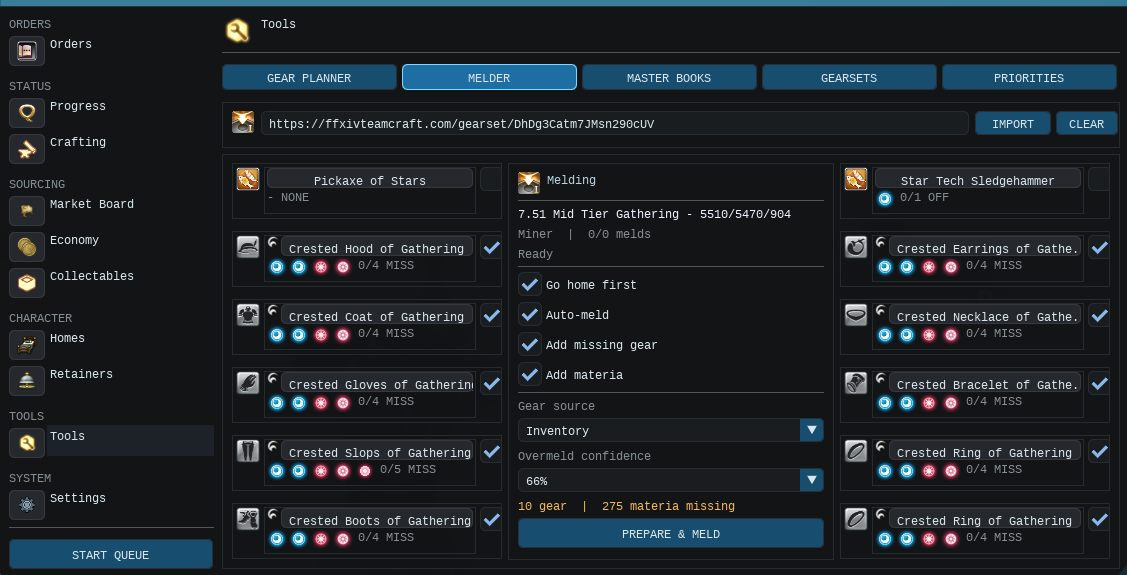
The Melder tool can import a Teamcraft gearset link and compare the target melds with the equipment currently available to the character.
Minbeth searches configured sources such as:
The Gear Plan shows whether an item was found, how many melds remain and whether it is complete or needs review.
The Materia tab calculates:
Missing materia can be added to the normal Orders queue, allowing the standard planner to find supported sources.
Overmelds are based on chance, so Minbeth estimates how many attempts may be needed. This is only a planning figure and cannot guarantee how many materia will be used.
As the melder runs, real success and failure results replace estimates so remaining requirements become more accurate.
Controls include Start, Pause, Resume and Stop. Minbeth can also begin a ready melding plan when the main queue is idle and the next required materia is available.
When enabled, Minbeth can extract materia from fully spiritbonded gear at a safe point and then continue the order. Gear that needs checking is marked for review instead of being changed automatically.
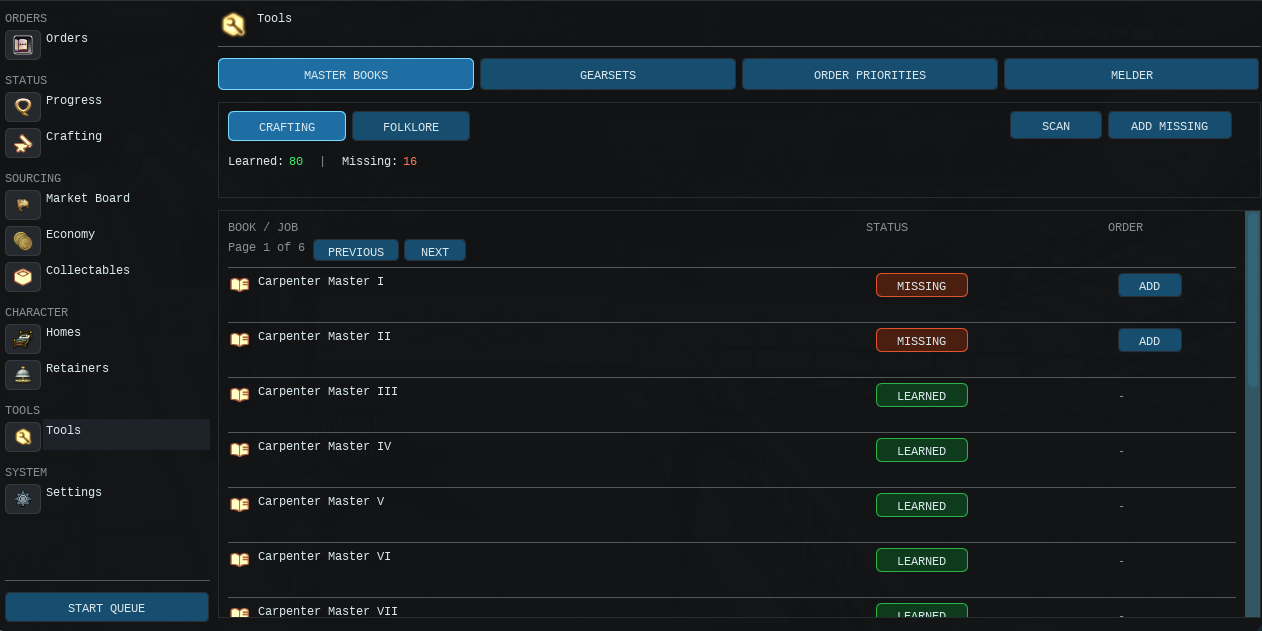
Open Tools > Master Books to review crafting Master Books and gathering folklore tomes.
The page separates crafting and folklore entries and reports states such as:
Use Add Missing to add the supported acquisition requirements to Orders, or add individual books selectively.
A book that is already in your bags must normally be used manually in-game. After using it, refresh or scan again so Minbeth can confirm that the recipes or gathering information are unlocked.
When a recipe needs a book you have not learned, Minbeth can block the route and show the missing unlock instead of trying to craft it anyway.
Minbeth can monitor equipment durability and repair at safe boundaries during an order.
Available modes are:
| Mode | Behaviour |
|---|---|
| Smart | Prefer self-repair with Dark Matter, then use an NPC mender when necessary. |
| Dark Matter Only | Use self-repair and do not fall back to an NPC. |
| NPC Mender Only | Travel to a verified mender and pay for repairs. |
Settings include:
Self-repair requires the relevant crafting job levels. The Repair page can scan equipped gear, show items below the threshold, calculate Dark Matter requirements and identify missing job capability.
Manual controls include Scan Gear Now, Repair Now and Cancel.
If repair becomes necessary during fishing, gathering or crafting, Minbeth attempts to leave the current activity at a safe point, perform the repair and resume the interrupted plan.
Most parts of Minbeth need to travel at some point. It can use:
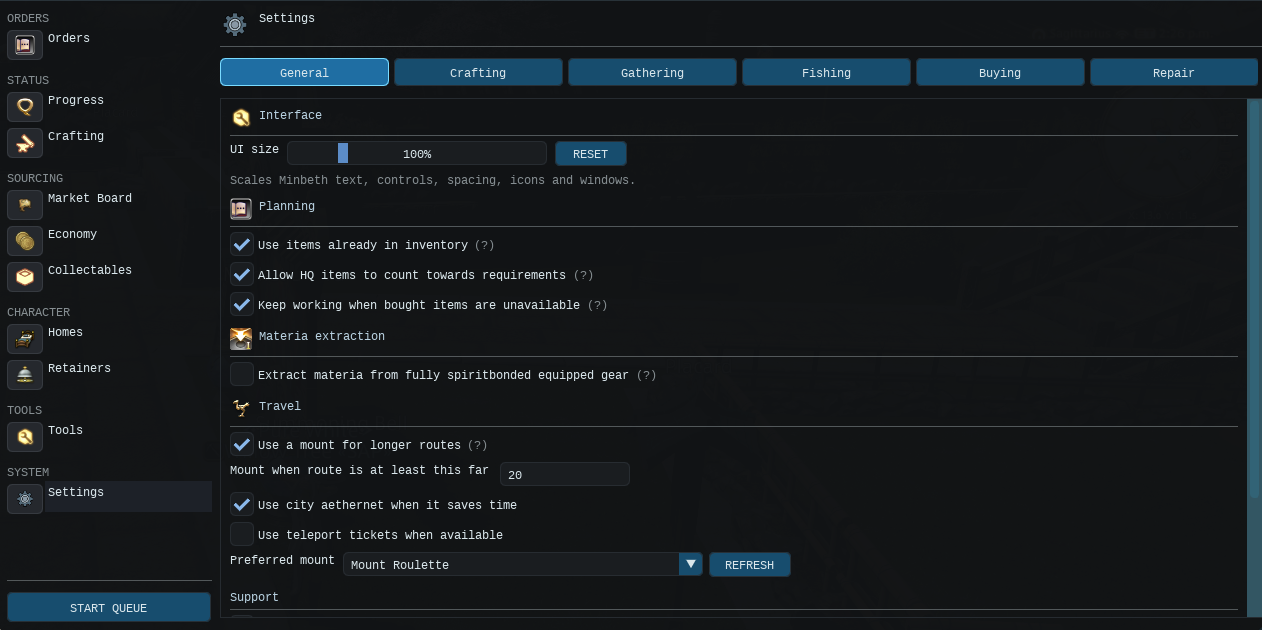
The mount-distance threshold and city-aethernet preference can be adjusted in Settings.
Mob-drop farming is optional and disabled by default.
When a supported item has known mob data, Minbeth can switch to a saved combat gearset and use the selected ACR to farm it. CypherCore Rotations can be used for combat.
Enable this source only after confirming:
If no executable mob route is known, the item remains unavailable or must be obtained from another enabled source.
Crafting and gathering consumables may be set globally, with per-order overrides where provided.
Crafting selections can include:
Gathering can use its own food selection and cordial settings.
Cypher Craft includes the selected consumables when checking HQ requirements. A recipe may need a different number of HQ sub-items depending on whether food or medicine is active.
Minbeth checks owned stock before attempting to use a selected consumable. Keep enough available for long batches, particularly when repeating orders.
| State | Meaning |
|---|---|
| Queued | The requirement has an executable task waiting in the plan. |
| Waiting | The route exists, but Minbeth is waiting for a condition such as time, weather, GP, calibration or another dependency. |
| Running | Minbeth is actively carrying out that task. |
| Unavailable | No currently executable route can satisfy the requirement with the enabled sources and known data. |
An unavailable item does not always stop the queue straight away. Minbeth can finish other jobs first and leave the blocked item visible. The missing route must still be fixed before the final order can finish.
Common causes include:
Minbeth may still be building the dependency plan, refreshing inventory, switching to the required job, waiting for Cypher's exact HQ calibration or watching for a timed window. Check the Progress and Schedule tabs before assuming it is stuck.
That is how the Cypher HQ system is meant to work. It finds the smallest number of HQ sub-items needed for the final recipe. Anything that does not need to be HQ stays NQ.
Cypher has proved that the final recipe can reach full quality from zero starting quality with the current stats, consumables and route. HQ sub-items would therefore be unnecessary.
Your current stats or consumables may need more starting quality. Minbeth may also be playing it safe because an exact route is not available. Hover over the HQ requirement in Progress to see the reason.
It may be reading your exact stats and asking Cypher Craft to solve the final recipe before using any materials. This is part of the HQ check.
Market Board buying must be enabled, the individual item must be selected, and an available listing must pass the unit, total and gil-reserve limits. Vendor buying has its own enable and priority settings.
Minbeth needs more than the item simply existing in the game. It also needs an enabled source and usable data for the recipe, node, fishing bank, vendor, exchange or mob. A missing unlock, gearset or bait can also block it.
Check its bait, bank, time, weather and Mooch-chain requirements. The Schedule tab and bait selector usually reveal the missing condition.
The item is present but its unlock has not yet been confirmed. Use the book manually in-game, then refresh the Master Books page.
Yes, when the required inventory settings are enabled. It can count carried NQ stock, permitted HQ stock and cached retainer inventory before creating new work.
It can continue with other executable tasks when the plan and settings allow it, including the option to continue after a Market Board failure. It cannot complete the final order while a required dependency remains unresolved.
The active job stops. When you start the queue again, Minbeth checks your current inventory and rebuilds the remaining plan from what has already been completed.
Minbeth works best when it has accurate gearsets, up-to-date retainer information, clear source priorities and proper spending limits.
Once those are set, it can handle the recipe tree and work through the crafting, gathering, fishing, buying and exchange jobs in the right order.
For difficult HQ recipes, Cypher Craft works out how many HQ sub-items are actually needed. Minbeth will make that amount instead of wasting time making every possible ingredient HQ.