

Sidebar
autotrades
This is an old revision of the document!
AutoTrades
Standalone
Gil send / receive
AutoTrades
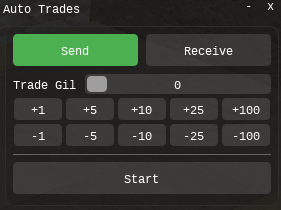
A focused gil trading addon. Open it from the Minion header. No ArthurLib required.
What AutoTrades does
- Send gil to a nearby player, or receive incoming gil trades
- Trade Gil slider plus ±1 / 5 / 10 / 25 / 100 million shortcuts
- Start / Stop from the window
- Send only after you select the target. AutoTrades does not search for players or change your target
- Confirms a trade only when the name in the trade window matches your current target
- Marks the target with a triangle, then sends
/trade - Maximum 1,000,000 gil per trade window; remaining amount continues in the next window
- Plays a completion sound when the send amount is finished
What it does not do
- No player-name field and no auto-targeting
- No world travel / Player Home
- No Move To / favorite locations
- No Free Company chest withdraw
- No tell-position helper
- No item trading UI
- No saved settings (Reload Lua resets mode and amount)
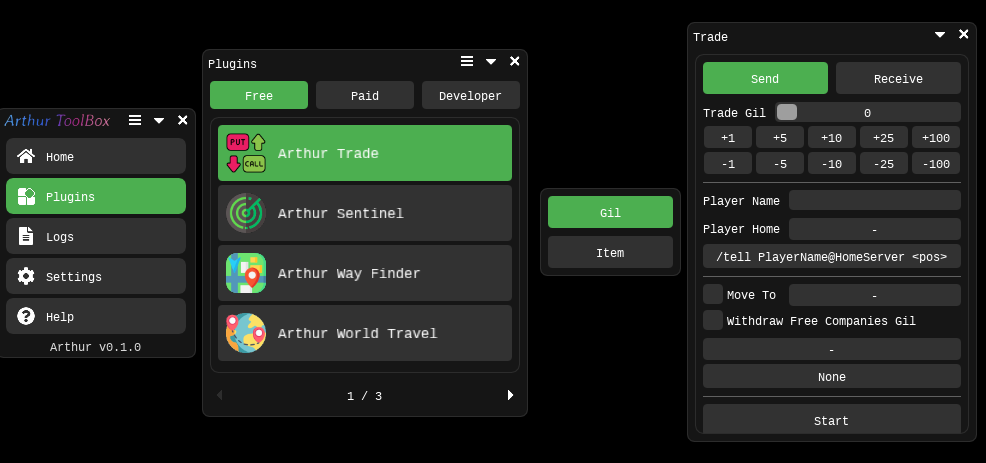
Want the extra tools? Install ArthurLib from the Minion Store, then open the Trade plugin inside the Arthur toolbox. AutoTrades stays the simple gil window; ArthurLib Trade is the full toolkit.
ArthurLib Trade — extra features
- Fill in player name and Player Home
- Find and target a nearby player by name
- Send current position:
/tell Name@HomeWorld <pos> - Move To a saved travel location (never chases the other player)
- Withdraw gil from the Free Company chest when inventory gil is not enough
- Travel to Player Home before trading
- Send transaction log:
Logs/Plugins/Trade/Transaction_records.log - Settings are saved (amount, names, Move To, FC withdraw, and so on)
- Gil / Item tabs — Item UI is a placeholder for now
How to send
- Stand next to the other player and target them yourself
- Set Send mode and the gil amount
- Press Start
- Keep the correct target selected until the amount is done
How to receive
- Set Receive mode
- Press Start
- Wait for the other player to trade you — AutoTrades does not start the trade
Quick comparison
| AutoTrades | ArthurLib Trade | |
|---|---|---|
| Send / Receive gil | Yes | Yes |
| Manual target only | Yes | Optional (name field can auto-select) |
| Player name / Player Home | No | Yes |
| Move To / FC chest / world travel | No | Yes |
| Transaction log | No | Send only |
| Requires ArthurLib | No | Yes |
Interface / 界面 / インターフェース / 인터페이스
独立插件
金币收发
AutoTrades
专注金币交易。从 Minion 顶栏打开。不依赖 ArthurLib。
AutoTrades 支持的功能
- 发送金币,或被动接收对方发起的金币交易
- Trade Gil 滑条,以及 ±1 / 5 / 10 / 25 / 100 百万快捷金额
- 窗口内 Start / Stop
- 发送前必须自己选中附近玩家。不会搜人,也不会自动改目标
- 交易窗口里的对方名字必须等于当前目标,对不上就不点确认
- 先给目标打三角标记,再发送
/trade - 单个交易窗口最多 1,000,000 金币,剩余金额自动进入下一笔
- 发送金额完成后播放提示音
不会做的事
- 没有玩家名输入,也不会自动选目标
- 不跨服、不填 Player Home
- 不去收藏地点 / Move To
- 不从部队箱取钱
- 不发送坐标密语
- 没有物品交易界面
- 不保存设置(Reload Lua 后模式和金额会回到默认)
需要增强功能?请到 Minion 商店下载 ArthurLib,然后打开 Arthur 工具箱里的 Trade 交易插件。AutoTrades 保持简单收发;完整工具在 ArthurLib。
ArthurLib 工具箱 · Trade 额外支持
- 填写玩家名和 Player Home
- 按名字查找并选中附近玩家
- 发送当前坐标:
/tell 名字@家服 <pos> - Move To 前往收藏的旅行地点(不会去追对方玩家坐标)
- 身上金币不够时,可从部队箱取钱
- 交易前可跨服到 Player Home
- Send 成交记录:
Logs/Plugins/Trade/Transaction_records.log - 配置会保存(金额、名字、Move To、部队取钱等)
- Gil / Item 分类 —— 物品交易界面目前仍是占位
如何发送
- 站到对方旁边,自己选中该玩家
- 选择 Send,填好金币数量
- 按 Start
- 金额完成前保持正确目标
如何接收
- 选择 Receive
- 按 Start
- 等对方发起交易 —— AutoTrades 不会主动 /trade
功能对照
| AutoTrades | ArthurLib Trade | |
|---|---|---|
| 发送 / 接收金币 | 有 | 有 |
| 只认手动目标 | 是 | 可选(填名字可自动选中) |
| 玩家名 / Player Home | 无 | 有 |
| Move To / 部队箱 / 跨服 | 无 | 有 |
| 成交记录 | 无 | 仅 Send |
| 需要 ArthurLib | 否 | 是 |
Interface / 界面 / インターフェース / 인터페이스
単体アドオン
ギル送受信
AutoTrades
ギル取引に特化したアドオンです。Minion のヘッダーから開きます。ArthurLib は不要です。
AutoTrades の機能
- 近くのプレイヤーへギルを送る、または相手からのギル取引を受け取る
- Trade Gil スライダーと ±1 / 5 / 10 / 25 / 100 百万のショートカット
- ウィンドウ内の Start / Stop
- 送信前に自分で対象を選択する必要があります。自動検索・自動ターゲット変更はありません
- 取引ウィンドウの相手名が現在のターゲットと一致しない場合は確定しません
- 三角形マーカーを付けてから
/tradeを送信します - 取引ウィンドウあたり最大 1,000,000 ギル。残りは次のウィンドウへ続きます
- 指定額の送信が終わると完了音を再生します
できないこと
- プレイヤー名入力、自動ターゲットなし
- ワールド移動 / Player Home なし
- Move To / お気に入り地点なし
- 部隊チェストからの出金なし
- 座標 Tell なし
- アイテム取引 UI なし
- 設定は保存されません(Reload Lua で初期化)
追加機能が必要ですか?Minion Store から ArthurLib を導入し、Arthur ツールボックス内の Trade プラグインを開いてください。
ArthurLib ツールボックス · Trade の追加機能
- プレイヤー名と Player Home を入力
- 名前で近くのプレイヤーを検索してターゲット
- 現在位置を送信:
/tell 名前@ホームワールド <pos> - Move To で保存した旅行地点へ移動(相手プレイヤーの座標は追いません)
- 所持ギルが不足している場合、部隊チェストから出金
- 取引前に Player Home へワールド移動
- Send の取引ログ:
Logs/Plugins/Trade/Transaction_records.log - 設定を保存(金額、名前、Move To、部隊出金など)
- Gil / Item タブ — Item UI は現在プレースホルダーです
送り方
- 相手の近くに立ち、自分でターゲットする
- Send とギル額を設定
- Start を押す
- 完了まで正しいターゲットを維持する
受け取り方
- Receive を選ぶ
- Start を押す
- 相手からの取引を待つ — AutoTrades は自分から /trade しません
比較
| AutoTrades | ArthurLib Trade | |
|---|---|---|
| ギル送受信 | あり | あり |
| 手動ターゲットのみ | はい | 任意(名前入力で自動選択可) |
| プレイヤー名 / Player Home | なし | あり |
| Move To / 部隊チェスト / ワールド移動 | なし | あり |
| 取引ログ | なし | Send のみ |
| ArthurLib が必要 | いいえ | はい |
Interface / 界面 / インターフェース / 인터페이스
독립 애드온
길 송수신
AutoTrades
길 거래에 집중한 애드온입니다. Minion 헤더에서 엽니다. ArthurLib는 필요하지 않습니다.
AutoTrades 기능
- 근처 플레이어에게 길을 보내거나, 상대가 건 길 거래를 수락
- Trade Gil 슬라이더와 ±1 / 5 / 10 / 25 / 100백만 단축 버튼
- 창에서 Start / Stop
- 보내기 전에 직접 대상을 선택해야 합니다. 자동 검색/자동 타겟 변경 없음
- 거래 창의 상대 이름이 현재 대상과 다를 경우 확인하지 않습니다
- 삼각형 표식을 붙인 뒤
/trade전송 - 거래 창당 최대 1,000,000 길. 남은 금액은 다음 창에서 이어집니다
- 지정 금액 전송이 끝나면 완료 효과음 재생
하지 않는 것
- 플레이어 이름 입력, 자동 타겟 없음
- 월드 이동 / Player Home 없음
- Move To / 즐겨찾기 장소 없음
- 부대 상자 출금 없음
- 좌표 Tell 없음
- 아이템 거래 UI 없음
- 설정 저장 없음 (Reload Lua 시 초기화)
추가 기능이 필요하신가요? Minion Store에서 ArthurLib를 설치한 뒤, Arthur 도구 상자의 Trade 플러그인을 여세요.
ArthurLib 도구 상자 · Trade 추가 기능
- 플레이어 이름과 Player Home 입력
- 이름으로 근처 플레이어를 찾아 타겟
- 현재 좌표 전송:
/tell 이름@본서버 <pos> - Move To로 저장한 여행 장소 이동 (상대 플레이어 좌표는 추적하지 않음)
- 소지 길이 부족하면 부대 상자에서 출금
- 거래 전 Player Home으로 월드 이동
- Send 거래 기록:
Logs/Plugins/Trade/Transaction_records.log - 설정 저장 (금액, 이름, Move To, 부대 출금 등)
- Gil / Item 탭 — Item UI는 현재 자리 표시만 있습니다
보내는 방법
- 상대 옆에 서서 직접 타겟
- Send와 길 금액 설정
- Start 누르기
- 완료될 때까지 올바른 타겟 유지
받는 방법
- Receive 선택
- Start 누르기
- 상대가 거래를 걸 때까지 대기 — AutoTrades는 먼저 /trade 하지 않습니다
비교
| AutoTrades | ArthurLib Trade | |
|---|---|---|
| 길 송수신 | 있음 | 있음 |
| 수동 타겟만 | 예 | 선택 (이름 입력 시 자동 선택 가능) |
| 플레이어 이름 / Player Home | 없음 | 있음 |
| Move To / 부대 상자 / 월드 이동 | 없음 | 있음 |
| 거래 기록 | 없음 | Send만 |
| ArthurLib 필요 | 아니오 | 예 |
Interface / 界面 / インターフェース / 인터페이스
Interface / 界面 / インターフェース / 인터페이스
AutoTrades
ArthurLib · Trade
autotrades.1788266216.txt.gz · Last modified: 2026/09/01 12:36 by arthurkeramon