
Cypher Craft
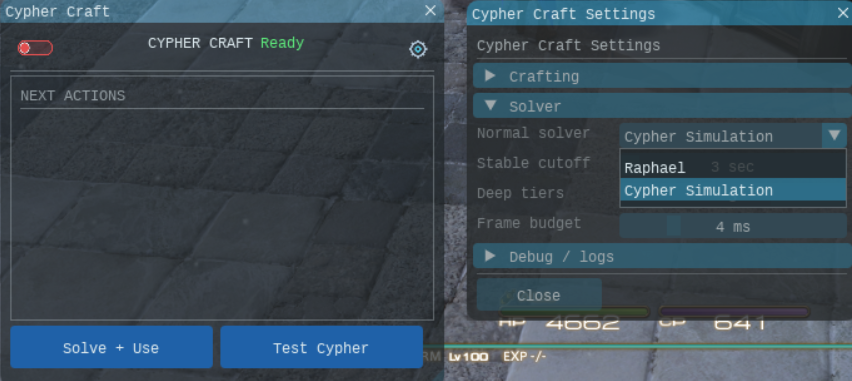
Have mats ready and want to get crafting? Cypher Craft picks a rotation for your recipe and current stats, then runs it in synthesis.
- Open FFXIVMinion → CypherCraft.
- Start a synthesis in the game, then turn on the power switch in Cypher Craft.
- Leave the crafting actions to Cypher Craft once it takes over.
Ways to use Cypher Craft
Standalone works directly from the Cypher Craft window. Madao suites can use it through Use Cyphers Crafting Solver. Minbeth uses it for the crafting steps in your Orders.
Cypher Craft choisit une rotation selon la recette et vos stats, puis joue les actions de synthèse.
- Ouvrez FFXIVMinion → CypherCraft.
- Lancez une synthèse dans le jeu, puis activez l’interrupteur de Cypher Craft.
- Laissez Cypher Craft exécuter les actions.
Façons d’utiliser Cypher Craft
En autonome, utilisez sa propre fenêtre. Les suites Madao peuvent l’utiliser avec Use Cyphers Crafting Solver. Minbeth l’utilise pour les étapes de fabrication des commandes.
Cypher Craft wählt eine Rotation passend zum Rezept und zu deinen Werten und führt sie in der Synthese aus.
- Öffne FFXIVMinion → CypherCraft.
- Starte im Spiel eine Synthese und schalte Cypher Craft ein.
- Lass Cypher Craft die Aktionen ausführen.
So nutzt du Cypher Craft
Eigenständig läuft es direkt über sein eigenes Fenster. In den Madao-Suiten kannst du Use Cyphers Crafting Solver einschalten. Minbeth nutzt es für die Synthesen deiner Aufträge.
Cypher Craftはレシピと現在のステータスに合わせて、製作のスキル回しを選んで実行します。
- FFXIVMinion → CypherCraft を開きます。
- ゲーム内で製作を始め、Cypher Craftの電源をオンにします。
- 製作が始まったら、スキルの実行はCypher Craftに任せます。
Cypher Craftの使い方
単体では専用ウィンドウから使えます。Madaoスイートでは Use Cyphers Crafting Solver を有効にします。Minbethでは注文の製作工程で使われます。
Cypher Craft 根据配方和属性选择生产手法,并在制作中执行。
- 打开 FFXIVMinion → CypherCraft。
- 在游戏中开始制作,再打开 Cypher Craft 的电源开关。
- 开始后让 Cypher Craft 执行技能。
使用方式
独立使用时直接操作 Cypher Craft 窗口。Madao 套件可通过 Use Cyphers Crafting Solver 使用它。Minbeth 用它执行订单中的制作步骤。
Cypher Craft는 레시피와 현재 능력치에 맞춰 제작 순서를 고르고 실행합니다.
- FFXIVMinion → CypherCraft를 엽니다.
- 게임에서 제작을 시작하고 Cypher Craft의 전원 스위치를 켭니다.
- 시작한 뒤에는 기술 사용을 Cypher Craft에 맡깁니다.
Cypher Craft 사용 방법
단독 사용은 Cypher Craft 창에서 바로 시작합니다. Madao 제품군에서는 Use Cyphers Crafting Solver를 켜면 됩니다. Minbeth는 주문의 제작 단계에서 사용합니다.
Crafting
Use the power switch when you want Cypher Craft to take over. It can reuse a matching rotation or work out a new one if needed.
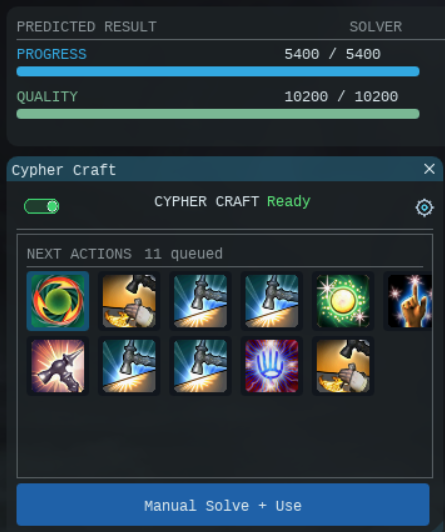
Next Actions shows what’s coming up. Hover over a skill icon for the name. Turn the power switch off to stop the addon.
For one craft, open synthesis and click Solve + Use. It plans and runs that craft.
What can I craft?
Use it for levelling recipes, everyday mats, endgame starred crafts, collectables, and supported Cosmic Exploration crafts. Cypher Craft works with the gear and actions you bring, so you can use the same window across your crafting jobs.
Got a batch of the same mats to make?
Start the next synthesis with the same setup and Cypher Craft can reuse a suitable rotation. If you switch jobs, change gear or start with a different amount of HQ mats, let it check the new setup.
Activez l’interrupteur pour lancer Cypher Craft. Il peut réutiliser une rotation adaptée ou en chercher une nouvelle.
Next Actions montre les actions à venir. Survolez une icône pour lire son nom. Coupez l’interrupteur pour arrêter l’addon.
Pour une seule synthèse, lancez-la et cliquez sur Solve + Use. La rotation est calculée et exécutée.
Que puis-je fabriquer ?
Utilisez-le pour monter vos métiers, fabriquer des matériaux, réaliser des recettes étoilées, des objets de collection et les recettes d’exploration cosmique prises en charge. Le même écran s’adapte à l’équipement et aux actions de chaque métier.
Plusieurs synthèses du même objet ?
Avec les mêmes réglages, Cypher Craft peut réutiliser une rotation adaptée. Après un changement de métier, d’équipement ou de matériaux HQ, laissez-le vérifier la nouvelle configuration.
Mit dem Schalter übernimmt Cypher Craft. Es nutzt eine passende Rotation oder sucht bei Bedarf eine neue.
Next Actions zeigt kommende Aktionen. Zeige auf ein Symbol, um den Namen zu sehen. Mit dem Schalter hältst du das Addon an.
Für eine einzelne Synthese öffnest du das Handwerk und klickst auf Solve + Use. Die Rotation wird berechnet und ausgeführt.
Was kann ich herstellen?
Nutze es für Rezepte zum Leveln, Materialien, Sternrezepte, Sammlerstücke und unterstützte Rezepte der Kosmo-Erkundung. Das Fenster passt sich an die Ausrüstung und Aktionen deines Handwerksberufs an.
Mehrere Stücke desselben Materials?
Mit derselben Ausrüstung und denselben Materialien kann Cypher Craft eine passende Rotation erneut nutzen. Nach einem Berufs- oder Ausrüstungswechsel oder anderen HQ-Materialien prüft es erneut.
電源をオンにするとCypher Craftが製作を引き継ぎます。合うスキル回しがあれば再利用し、必要なら新しい手順を探します。
Next Actions に次のスキルが表示されます。アイコンにカーソルを合わせると名前が見えます。止めるには電源をオフにします。
1回だけ使う場合は、製作を開始して Solve + Use を押します。手順を探して、そのまま実行します。
何を作れる?
レベル上げ用のレシピ、普段使いの素材、星付きレシピ、収集品、対応するコスモエクスプローラーの製作に使えます。同じ画面から、今のクラスの装備とスキルに合わせて製作できます。
同じ素材を何個も作るとき
同じ条件なら合うスキル回しを再利用できます。クラス、装備、HQ素材の数を変えたら、新しい条件に合わせて確認します。
打开电源开关,让 Cypher Craft 接手。它会复用合适的手法,必要时重新计算。
Next Actions 显示接下来要用的技能。悬停图标查看名称。关掉电源开关即可停止插件。
只做一次时,先进入制作,再点 Solve + Use。它会计算手法并执行。
能做什么?
可用于练级配方、常用材料、星级配方、收藏品以及支持的宇宙探索制作。同一个窗口会根据当前职业的装备和技能调整。
要连续做同一种材料?
配置相同时可以复用合适的手法。换职业、换装备或改变 HQ 材料用量后,等 Cypher Craft 检查新配置。
전원 스위치를 켜면 Cypher Craft가 제작을 맡습니다. 맞는 순서가 있으면 다시 쓰고 필요하면 새로 계산합니다.
Next Actions에서 다음 기술을 볼 수 있습니다. 아이콘에 마우스를 올리면 이름이 나옵니다. 멈추려면 전원 스위치를 끕니다.
한 번만 만들려면 제작을 시작하고 Solve + Use를 누릅니다. 순서를 계산한 뒤 실행합니다.
무엇을 만들 수 있나요?
레벨업용 레시피, 자주 쓰는 재료, 별이 붙은 레시피, 소장품 및 지원되는 우주 개척 제작에 사용할 수 있습니다. 같은 창에서 현재 제작 직업의 장비와 기술에 맞춰 실행합니다.
같은 재료를 여러 개 만드나요?
조건이 같으면 맞는 제작 순서를 다시 쓸 수 있습니다. 직업, 장비 또는 HQ 재료 수량이 바뀌면 새 조건을 확인하도록 기다리세요.
Normal Recipes & Collectables
Start with a normal recipe, a star recipe or a collectable. Your gear, CP, unlocked skills and starting quality still matter.
The prediction panel shows the progress and quality the current plan is expected to reach. While the addon is still thinking, that estimate can change. For a collectable, check the collectability tier you need before committing mats.
Settings → Solver → Normal solver offers Raphael and Cypher Simulation when a new rotation is needed. Test Raphael or Test Cypher starts a fresh solve on a normal craft at step one and uses the result.
When quality comes up short
Check the predicted quality before starting another craft. If you’re just shy of the HQ or collectability target, try adding HQ mats where the recipe allows it, or bring better food, medicine or gear. Check that your buffs will last if you’re doing a batch.
Match the quality to the job
Making NQ mats for levelling and making HQ gear for raid night are different jobs. For collectables, use the predicted quality to see whether you’re on track for the turn-in tier you want.
Essayez une recette normale, étoilée ou de collection. Équipement, PS, actions débloquées et qualité de départ comptent.
La prévision montre la progression et la qualité attendues. Elle peut changer pendant la recherche. Pour un objet de collection, vérifiez le palier voulu.
Dans Settings → Solver → Normal solver, choisissez Raphael ou Cypher Simulation pour les nouvelles rotations. Test Raphael et Test Cypher recalculent et exécutent une rotation à la première étape.
Si la qualité est trop basse
Vérifiez la qualité prévue avant de relancer. Si vous êtes juste sous l’objectif HQ ou de collection, essayez des matériaux HQ quand la recette le permet, ou améliorez votre équipement, votre nourriture ou votre potion. Vérifiez la durée des buffs pour une série.
Choisir l’objectif
Des matériaux NQ pour monter de niveau et de l’équipement HQ pour un raid ont des objectifs différents. Pour les objets de collection, comparez la qualité prévue au palier de livraison souhaité.
Beginne mit normalen Rezepten, Sternrezepten oder Sammlerstücken. Ausrüstung, HP, freigeschaltete Aktionen und Startqualität zählen.
Die Vorschau zeigt erwarteten Fortschritt und Qualität. Während der Suche kann sie sich ändern. Prüfe bei Sammlerstücken die gewünschte Wertigkeitsstufe.
Unter Settings → Solver → Normal solver stehen Raphael und Cypher Simulation zur Wahl. Test Raphael und Test Cypher berechnen und nutzen eine neue Rotation ab Schritt eins.
Wenn Qualität fehlt
Prüfe vor der nächsten Synthese die erwartete Qualität. Fehlt dir wenig für HQ oder die gewünschte Wertigkeit, versuche HQ-Materialien, sofern möglich, oder bessere Ausrüstung, Nahrung oder Medizin. Prüfe bei Serien die Restdauer deiner Buffs.
Das passende Qualitätsziel
NQ-Materialien zum Leveln und HQ-Ausrüstung fürs Raiden haben verschiedene Ziele. Vergleiche bei Sammlerstücken die Vorschau mit der Wertigkeitsstufe für deine Abgabe.
通常レシピ、星付きレシピ、収集品で使えます。装備、CP、使えるスキル、開始時の品質が結果に影響します。
予測欄には工数と品質の見込みが表示されます。探索中は数値が変わることがあります。収集品は必要な収集価値も確認してください。
Settings → Solver → Normal solver で Raphael または Cypher Simulation を選べます。Test Raphael と Test Cypher は通常製作の1手目から新しい手順を探し、実行します。
品質が足りないとき
次の製作前に予測品質を見てください。HQや収集価値に少し届かない場合は、使えるならHQ素材を増やすか、装備や食事、薬を見直しましょう。まとめて作るときはバフの残り時間も確認してください。
目的に合った品質を確認する
レベル上げ用のNQ素材とレイド用のHQ装備では目的が違います。収集品は予測品質を見て、納品したい段階に届きそうか確認しましょう。
可用于普通配方、星级配方和收藏品。装备、CP、已解锁技能和起始品质都会影响结果。
预测栏显示预计进度和品质,计算中可能变化。做收藏品时,先核对所需档位。
在 Settings → Solver → Normal solver 选择 Raphael 或 Cypher Simulation。Test Raphael 和 Test Cypher 从普通配方的第一步重新计算并执行。
品质差一点怎么办?
开始下一次制作前先看预计品质。如果离 HQ 或收藏品档位只差一点,可以在配方允许时多用 HQ 材料,或改善装备、食物和药水。批量制作前看一下增益还剩多久。
按用途看品质
练级用的 NQ 材料和打团用的 HQ 装备目标不同。做收藏品时,用预计品质判断能否达到你想要的交纳档位。
일반 레시피, 별이 붙은 레시피, 소장품에 사용할 수 있습니다. 장비, CP, 배운 기술과 시작 품질에 따라 결과가 달라집니다.
예측 화면은 예상 작업량과 품질을 보여 줍니다. 계산 중에는 바뀔 수 있습니다. 소장품은 필요한 단계도 확인하세요.
Settings → Solver → Normal solver에서 Raphael 또는 Cypher Simulation을 고릅니다. Test Raphael과 Test Cypher는 일반 제작 첫 단계에서 새 순서를 계산하고 실행합니다.
품질이 조금 모자랄 때
다음 제작 전에 예상 품질을 확인하세요. HQ나 소장 가치 목표에 조금 못 미치면, 가능한 경우 HQ 재료를 늘리거나 장비, 음식, 약을 바꿔 보세요. 여러 개를 만들 때는 버프 남은 시간도 확인하세요.
용도에 맞춰 품질 보기
레벨업용 NQ 재료와 레이드용 HQ 장비는 목표가 다릅니다. 소장품은 예상 품질을 보고 원하는 납품 단계에 닿을지 확인하세요.
Expert Recipes
The best move in an Expert Recipe can change from one step to the next. Cypher Craft checks the new condition after each action and decides what to use next.
It might spend a Good on a quality action, use Pliant to save CP on a skill like Manipulation, or use Primed to get more turns from a buff. The choice depends on your CP, durability, progress, quality and active buffs.
Start the recipe and turn on Cypher Craft or click Solve + Use. Keep an eye on Next Actions. Two runs of the same recipe can use different skills. Once quality is capped, the focus shifts to finishing progress.
Normal solver applies to regular recipes. Expert Recipes adapt as the craft plays out.
Before you start an Expert craft
Bring up-to-date gear and melds. Check Craftsmanship, Control and CP after food and medicine. Give yourself some room above the recipe minimums, especially if you’re aiming for top collectability.
If you’re crafting as a Specialist, equip the job’s specialist soul crystal and bring Crafter’s Delineations. Unlocked actions like Careful Observation, Heart and Soul and Quick Innovation spend them and give Cypher Craft more options when they’re available.
Expert RNG still matters. A run with a few useful conditions can reach a different collectability tier from the next one on the same gear. Check what you actually made before committing to a batch.
Sur une recette experte, l’état peut changer le meilleur choix à chaque étape. Cypher Craft relit la synthèse après chaque action.
Il peut profiter de Good pour la qualité, de Pliant pour économiser des PS ou de Primed pour prolonger un effet. Il tient compte des PS, de la solidité, de la progression et de la qualité.
Lancez la recette, puis activez l’interrupteur ou cliquez sur Solve + Use. Suivez Next Actions. Deux synthèses peuvent suivre des étapes différentes. Une fois la qualité au maximum, l’addon se concentre sur la progression.
Vos stats et les états obtenus influencent le résultat. Normal solver concerne les recettes ordinaires.
Préparer une recette experte
Équipez-vous et sertissez vos matérias. Vérifiez les stats et les PS après nourriture et potion. Gardez une marge au-dessus du minimum, surtout si vous visez le meilleur palier.
En spécialiste, équipez le cristal de votre métier et prenez des Crafter’s Delineations. Des actions comme Careful Observation, Heart and Soul et Quick Innovation en consomment et offrent plus de choix à Cypher Craft.
Les états restent aléatoires. Deux synthèses avec le même équipement peuvent finir à des paliers différents. Vérifiez le résultat avant de lancer une série.
Bei Expertenrezepten kann sich die beste Aktion mit jedem Zustand ändern. Cypher Craft bewertet die Synthese nach jeder Aktion neu.
Bei Good kann es Qualität aufbauen, bei Pliant HP sparen und bei Primed einen Effekt verlängern. Dabei zählen HP, Belastbarkeit, Fortschritt, Qualität und aktive Effekte.
Starte das Rezept und schalte Cypher Craft ein oder nutze Solve + Use. Unter Next Actions siehst du, wie die Aktionen wechseln. Bei maximaler Qualität konzentriert es sich auf den Abschluss.
Deine Werte und die Zustände beeinflussen das Ergebnis. Normal solver gilt für normale Rezepte.
Vor einem Expertenrezept
Bring aktuelle Ausrüstung mit Materia mit. Prüfe deine Werte und HP nach Nahrung und Medizin. Plane etwas Spielraum über den Mindestwerten ein, vor allem für die höchste Wertigkeitsstufe.
Als Spezialist brauchst du den Seelenkristall des Handwerksberufs und Crafter’s Delineations. Aktionen wie Careful Observation, Heart and Soul und Quick Innovation verbrauchen sie und geben Cypher Craft mehr Möglichkeiten.
Die Zustände hängen vom Zufall ab. Mit derselben Ausrüstung können zwei Versuche unterschiedliche Wertigkeitsstufen erreichen. Prüfe das Ergebnis vor einer Serie.
高難易度レシピでは状態によって最適な手が変わります。Cypher Craftはスキルを使うたびに次の行動を選びます。
Good で品質を上げたり、Pliant でCPを節約したり、Primed で効果を延ばしたりします。残りCP、耐久、工数、品質、効果を見て判断します。
製作を始めて電源をオンにするか Solve + Use を押します。Next Actions を見ると、同じレシピでも手順が変わることがあります。品質が最大になれば工数を仕上げます。
結果はステータスと状態に左右されます。Normal solver は通常レシピ用です。
高難易度製作の準備
装備とマテリアを整え、食事と薬を使った後の作業精度、加工精度、CPを確認します。最高の収集価値を狙うなら、最低条件に余裕を持たせましょう。
マイスターで製作するなら、対応するソウルクリスタルと Crafter’s Delineations を用意します。Careful Observation、Heart and Soul、Quick Innovation などの習得済みスキルを使うと消費し、選べる手が増えます。
状態には運も絡みます。同じ装備でも収集価値の段階が変わることがあります。まとめて作る前に実際の結果を確認してください。
高难度配方的状态可能改变下一步的最佳选择。Cypher Craft 每用一次技能,都会重新判断下一步。
可以借 Good 提升品质,用 Pliant 节省 CP,或用 Primed 延长增益。它会结合 CP、耐久、进度、品质和当前增益来选择。
开始制作并打开电源,或点击 Solve + Use。留意 Next Actions,同一个配方两次也可能用不同技能。品质满后,优先完成进度。
属性和实际出现的状态会影响结果。Normal solver 用于普通配方。
高难度制作前的准备
准备合适的装备和魔晶石。吃食物和药后检查作业精度、加工精度和 CP。如果要冲最高收藏品档位,属性最好比配方最低要求多留些余量。
使用专家职业时,装备对应的工匠之证并带上 Crafter’s Delineations。已解锁的 Careful Observation、Heart and Soul、Quick Innovation 等技能会消耗它们,也给 Cypher Craft 多一些应对选择。
高难度配方也看运气。同一套装备可能做出不同档位的收藏品。批量制作前先看实际结果。
고난도 레시피는 상태에 따라 다음 기술이 달라집니다. Cypher Craft는 기술을 쓸 때마다 다음 행동을 다시 정합니다.
Good에서 품질을 올리고, Pliant로 CP를 아끼거나 Primed로 버프를 연장할 수 있습니다. CP, 내구도, 작업량, 품질과 버프를 함께 봅니다.
제작을 시작하고 전원을 켜거나 Solve + Use를 누릅니다. Next Actions를 보면 같은 레시피라도 기술이 달라질 수 있습니다. 품질이 최대라면 작업량을 마무리합니다.
능력치와 실제로 나온 상태에 따라 결과가 달라집니다. Normal solver는 일반 레시피에 적용됩니다.
고난도 제작 전 준비
최신 장비와 마테리아를 갖추세요. 음식과 약을 쓴 뒤 작업 숙련도, 가공 숙련도, CP를 확인하세요. 최고 소장 가치가 목표라면 레시피 최소 조건보다 여유를 두세요.
전문장인이라면 해당 직업 소울 크리스탈을 장착하고 Crafter’s Delineations를 챙기세요. 배운 Careful Observation, Heart and Soul, Quick Innovation 등의 기술은 이를 소모하며 Cypher Craft에 더 많은 선택지를 줍니다.
고난도 제작에는 운도 따릅니다. 같은 장비로도 소장 가치 단계가 달라질 수 있습니다. 여러 개를 만들기 전에 실제 결과를 확인하세요.
Minbeth
Run your crafting orders with Minbeth
Pick what you want to make in Minbeth. Minbeth plans the ingredients and intermediate crafts. When a synthesis starts, Cypher Craft handles the rotation.
How Minbeth decides which mats need to be HQ
For an HQ order, Cypher Craft checks how much starting quality it needs to reach 100% quality with your job, gear, skills, food and medicine. Minbeth turns that target into specific quantities of HQ mats. It takes into account what you already own and what it plans to make. If the craft can hit full quality from zero, the mats can stay NQ.
Say your gear can finish a difficult chest piece at full quality if you start with two HQ ingots. Minbeth can plan those two ingots as HQ and use NQ for the rest of the mats. On a larger order it works out the quantities for the batch. The exact mix depends on the recipe, your setup and what you have in stock.
See the plan before spending gil
In Minbeth, save the manufacturing order with HQ selected, then check the recipe in Crafting. Hover over the quality status to see why HQ mats are needed and what’s already covered once the plan is ready. If a saved order needs help, switch to the right crafter and use RECIPE RESCUE to check whether food, medicine or HQ mats can get it over the line.
Fabriquer vos commandes avec Minbeth
Choisissez l’objet à fabriquer dans Minbeth. Minbeth organise les matériaux et les sous-recettes. Cypher Craft exécute les actions de synthèse.
Quels matériaux doivent être HQ ?
Pour une commande HQ, Cypher Craft estime la qualité de départ nécessaire pour atteindre 100 %, avec votre métier, équipement, actions, nourriture et potion. Minbeth traduit ce seuil en quantités HQ et tient compte de votre stock et des sous-recettes prévues. Si la qualité maximale est possible en partant de zéro, les matériaux peuvent rester NQ.
Par exemple, si deux lingots HQ suffisent pour une pièce difficile, Minbeth peut prévoir ces deux lingots HQ et garder le reste en NQ. Pour une série, il ajuste les quantités au nombre d’objets à fabriquer.
Vérifier le plan
Enregistrez une commande HQ et ouvrez Crafting. Une fois le plan prêt, survolez le statut de qualité. Pour une commande difficile, passez sur le bon métier et utilisez RECIPE RESCUE pour vérifier si nourriture, potion ou matériaux HQ peuvent aider.
Aufträge mit Minbeth fertigen
Wähle in Minbeth das gewünschte Produkt. Minbeth plant Materialien und Zwischenprodukte. Cypher Craft führt die Synthese aus.
Welche Materialien sollen HQ sein?
Bei einem HQ-Auftrag prüft Cypher Craft mit deinem Beruf, deiner Ausrüstung, deinen Aktionen, Nahrung und Medizin, welche Startqualität für 100 % Qualität nötig ist. Minbeth berechnet daraus die HQ-Mengen und berücksichtigt Vorräte und geplante Zwischenprodukte. Reicht Startqualität null, können die Materialien NQ bleiben.
Braucht ein schwieriges Rüstungsteil zum Beispiel zwei HQ-Barren, kann Minbeth genau diese beiden als HQ einplanen. Bei mehreren Stücken rechnet es die Mengen für den Auftrag aus.
Den Plan prüfen
Speichere den HQ-Auftrag und öffne Crafting. Zeige auf den Qualitätsstatus, sobald der Plan bereit ist. Wechsel bei einem schwierigen Auftrag zum passenden Beruf und nutze RECIPE RESCUE, um Nahrung, Medizin oder HQ-Materialien prüfen zu lassen.
Minbethで注文を製作する
Minbethで作りたい品を選びます。Minbethが素材と中間素材を計画し、製作が始まるとCypher Craftがスキルを実行します。
どの素材をHQにする?
HQ注文では、クラス、装備、スキル、食事、薬に合わせて、最終品質100%に必要な初期品質をCypher Craftが調べます。Minbethは手持ちや製作予定の素材を考慮し、素材ごとのHQ個数を決めます。初期品質0で最大まで届くなら素材はNQのままで構いません。
例えば難しい装備にHQインゴットが2個あれば足りる場合、その2個だけをHQにして残りをNQにできます。複数作るときはまとめて必要数を計算します。
計画を確認する
HQ注文を保存し、Crafting を開きます。計画ができたら品質表示にカーソルを合わせます。難しい注文は対応する製作クラスに切り替え、RECIPE RESCUE で食事、薬、HQ素材が役立つか確認できます。
用 Minbeth 完成制作订单
在 Minbeth 选好要做的成品。Minbeth 规划材料和中间件,开始制作时由 Cypher Craft 执行手法。
哪些材料需要 HQ?
对 HQ 订单,Cypher Craft 会结合职业、装备、技能、食物和药水计算达到 100% 品质所需的起始品质。Minbeth 再算出具体哪些材料要 HQ、需要几个,同时考虑库存和计划制作的材料。如果从零品质就能做满,材料可以用 NQ。
例如,某件难做的装备只需两个 HQ 锭就能做满品质,Minbeth 可以只安排这两个锭用 HQ,其余用 NQ。制作多件时会计算整批用量。
先看计划
保存 HQ 制作订单后打开 Crafting,等计划完成,再悬停品质状态查看详情。遇到困难订单,切换到对应制作职业后用 RECIPE RESCUE 查看食物、药水或 HQ 材料能否帮上忙。
Minbeth로 제작 주문 실행
Minbeth에서 완성품을 고릅니다. Minbeth가 재료와 중간 재료를 계획하고, 제작이 시작되면 Cypher Craft가 기술을 실행합니다.
어떤 재료가 HQ여야 하나요?
HQ 주문에서는 직업, 장비, 기술, 음식과 약을 기준으로 품질 100%에 필요한 시작 품질을 Cypher Craft가 확인합니다. Minbeth는 보유 재료와 제작 예정분을 고려해 재료별 HQ 수량을 정합니다. 시작 품질 0으로도 충분하면 재료를 NQ로 쓸 수 있습니다.
예를 들어 어려운 방어구에 HQ 주괴 두 개면 충분하다면, 두 개만 HQ로 준비하고 나머지는 NQ로 쓸 수 있습니다. 여러 개를 만들 때는 주문 전체 수량을 계산합니다.
계획 확인
HQ 제작 주문을 저장하고 Crafting을 엽니다. 계획이 준비되면 품질 상태에 마우스를 올려 보세요. 어려운 주문은 해당 제작 직업으로 전환한 뒤 RECIPE RESCUE에서 음식, 약 또는 HQ 재료가 도움이 되는지 확인할 수 있습니다.
Settings & Help
The gear icon opens Cypher Craft Settings. Start with the defaults. Change cadence if the pace feels off on your setup.
Under Crafting, Fast adaptive waits for the craft to advance and adjusts the timing. Macro 3s gives you a steady three-second pace. Auto finish lets the addon finish progress when its planned actions run out.
If no rotation starts, make sure synthesis is open and check the message in the window. While it’s working, use Cancel solve if you need to stop the search. For a fresh normal solve, start from step one. For help in Discord, include the recipe, your stats, and the message you saw.
La roue dentée ouvre Cypher Craft Settings. Commencez avec les réglages par défaut.
Dans Crafting, Fast adaptive ajuste le rythme selon les étapes. Macro 3s garde un rythme de trois secondes. Auto finish peut terminer la progression à la fin de la rotation.
Si rien ne démarre, vérifiez que la synthèse est ouverte et lisez le message. Pour une nouvelle recherche normale, repartez de la première étape. Sur Discord, joignez la recette, vos stats et le message.
Das Zahnrad öffnet Cypher Craft Settings. Starte mit den Standardeinstellungen.
Unter Crafting passt Fast adaptive das Tempo an. Macro 3s nutzt drei Sekunden pro Aktion. Auto finish kann nach der Rotation den Fortschritt abschliessen.
Falls nichts startet, prüfe das Synthesefenster und die Meldung. Beginne für eine neue normale Rotation bei Schritt eins. Nenne im Discord Rezept, Werte und Meldung.
歯車アイコンで Cypher Craft Settings を開きます。まずは初期設定で試してください。
Crafting の Fast adaptive は製作の進みに合わせて間隔を調整します。Macro 3s は3秒間隔です。Auto finish は手順の終了後に工数を仕上げます。
動かない場合は製作画面と表示メッセージを確認してください。通常レシピを新しく計算するときは1手目から始めます。Discordで質問するときはレシピ、ステータス、表示されたメッセージを添えてください。
齿轮图标打开 Cypher Craft Settings。建议先用默认设置。
在 Crafting 中,Fast adaptive 会按制作进度调整节奏,Macro 3s 使用固定的三秒间隔。Auto finish 可在手法用完后补足进度。
如果没有开始,确认制作界面已打开,并查看提示。普通配方重新计算时,从第一步开始。在 Discord 求助时附上配方、属性和提示。
톱니바퀴를 누르면 Cypher Craft Settings가 열립니다. 기본 설정으로 먼저 써 보세요.
Crafting에서 Fast adaptive는 제작 진행에 맞게 간격을 조절하고 Macro 3s는 3초 간격을 사용합니다. Auto finish는 계획한 기술을 다 쓴 뒤 작업량을 채울 수 있습니다.
시작하지 않으면 제작 창과 메시지를 확인하세요. 일반 제작 순서를 새로 계산할 때는 첫 단계에서 시작하세요. Discord에 문의할 때는 레시피, 능력치, 표시된 메시지를 알려 주세요.